
One morning last month I woke up, looked at my inbox, and saw:
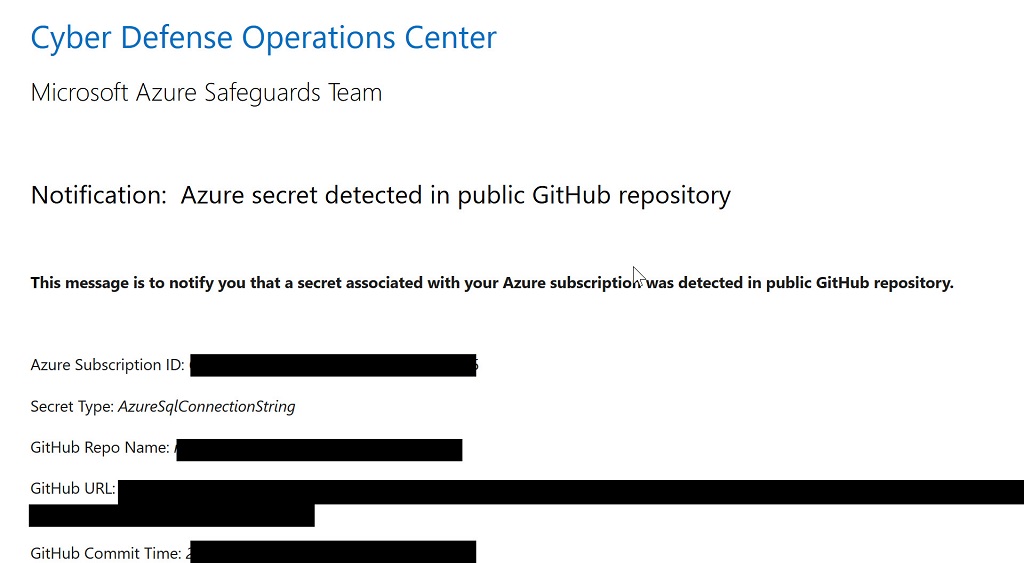
I must admit, my first instinct when seeing any email with the word cyber in a 24 point font is to banish the message into a spam bucket, but something kept me around long enough to follow a link to GitHub. Lo and behold! Here was a connection string with the username and password to an Azure SQL instance using a familiar naming convention. To make a long story short, yes, someone outside the company accidentally checked in some test code with a connection string into a public repository.
There are many stories to tell here, but one story is another angle on the evolution of Microsoft. There was a time when the company shipped the world’s largest target for viruses and malware with no protection from viruses and malware installed. We were left to protect ourselves. The plan worked well for developers and other software savvy individuals, but not so well for the average user. Microsoft is now more aggressive and proactive about security, which is good for everyone.
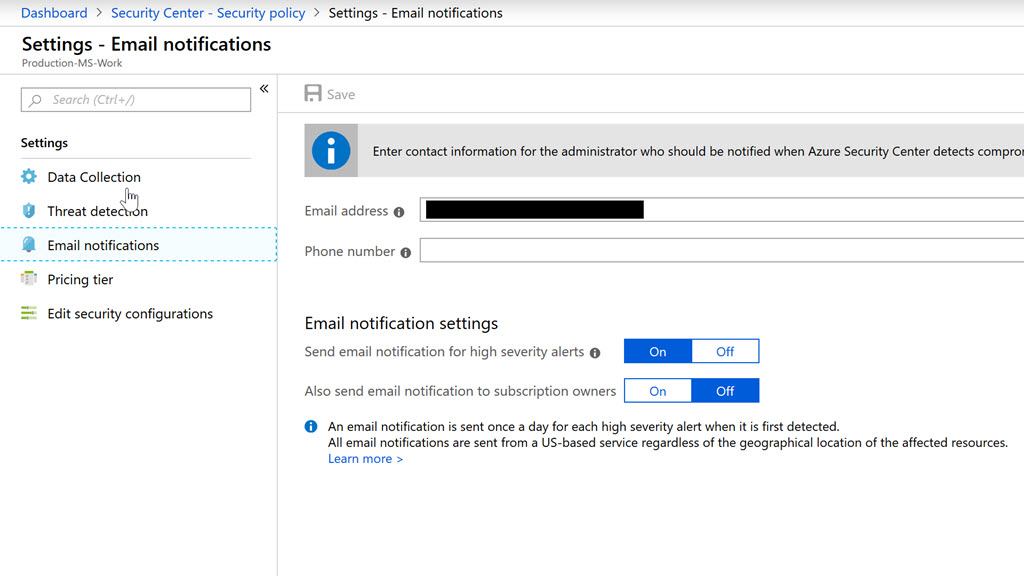
One additional piece of information. Alerts like the one shown here are obviously important. But, by default the alert only goes to the subscription owner. You can change this setting in the portal by going into Security Center and opening the Security Policy blade. In the policy blade you'll see a list of subscriptions each with a link to configure settings. Click on the link and you can then go to Email notifications and configure a group email address.
Hope that helps!
When I started working with the Go language using Visual Studio Code a few months ago, the Go extension for VS Code auto-formatted one type definition like so:
type ResourceInfo struct {
    ResourceID         string
    SubscriptionID     string
    GroupName          string
    Name               string
    Type               string
    RunID              string
    DocumentType       string
    Location           string
    LocationMisAligned bool
}
When I was a C / C++ developer I created and read right-aligned code all the time. The alignment makes patterns in code easier to find. For another example in Go, it’s easier to see which entries point to a "no-operation" function in the following hash map, because you can scan vertically down the file.
var resourceMap = map[string]func(*ResourceInfo) {
    "Microsoft.Sql/servers":           visitSQLServer,
    "Microsoft.Sql/servers/databases": noop,
    "Microsoft.Cache/Redis":           visitRedisCache,
    "Microsoft.Web/sites":             visitWebSite,
    "Microsoft.Portal/dashboards":     noop,
    // ...
}
Keeping code aligned requires some work, and without tool support it is rare to see the convention in .NET languages. The only tool I've found that comes close to supporting this style is the Always Algined extension for Visual Studio.
In a previous opinion, we looked at the responsibilities of the Startup class in ASP.NET Core. A consistent problem I run across in code reviews is the amount of code that gravitates into the Startup class, making the entire file cluttered and not well factored.
We’ll look at a variety of solutions to declutter Startup.cs, but let’s start with a simple task. Once we agree that the Startup class is only responsible for service configuration and middleware, we should move other code out of Startup and into Program.cs where the Main entry point lives. Ironically, it is the .NET Core templates that I believe encourage cluttered and mismatched code inside of Startup.cs, but Microsoft has been improving these templates with each release. For example, here’s the startup code generated by dotnet new in 1.1.
public Startup(IHostingEnvironment env)
{
    var builder = new ConfigurationBuilder()
            .SetBasePath(env.ContentRootPath)
            .AddJsonFile("appsettings.json")
            .AddJsonFile($"appsettings.{env.EnvironmentName}.json", optional: true)
            .AddEnvironmentVariables();
    Configuration = builder.Build();
}

// ...

public void Configure(IApplicationBuilder app, IHostingEnvironment env,
                               ILoggerFactory loggerFactory)
{

    loggerFactory.AddConsole(Configuration.GetSection("Logging"));
    loggerFactory.AddDebug();

         // ...
}
Notice how the code is configuring the configuration system in the constructor, and is configuring the logging settings in the method responsible for installing middleware. New templates in 2.1 remove these bits of code. Some of the code has moved into WebHost.CreateDefaultBuilder, but even if you need custom settings for configuration or logging, I’d suggest keeping the code out of Startup, and place the code into Program.cs instead.
As an example, here’s what Program.cs could look like, if it took on configuration and logging settings.
public static IWebHostBuilder CreateWebHostBuilder(string[] args) =>
            WebHost
                .CreateDefaultBuilder(args)
                .ConfigureAppConfiguration((hostingContext, config) =>
                {
                    var env = hostingContext.HostingEnvironment;
                    config.AddJsonFile("appsettings.json", optional: true, reloadOnChange: true);
                    // ...
                })
                .ConfigureLogging((hostingContext, logging) =>
                {
                    logging.AddConfiguration(hostingContext.Configuration.GetSection("Logging"));
                    logging.AddConsole();
                    // ...
                })
                .UseStartup<Startup>();
Look at extension methods for IWebHostBuilder and see what else you can move into Program.cs. In the next opinion post, we’ll talk about techniques for getting rid of the other clutter in the Configure* methods of Startup.
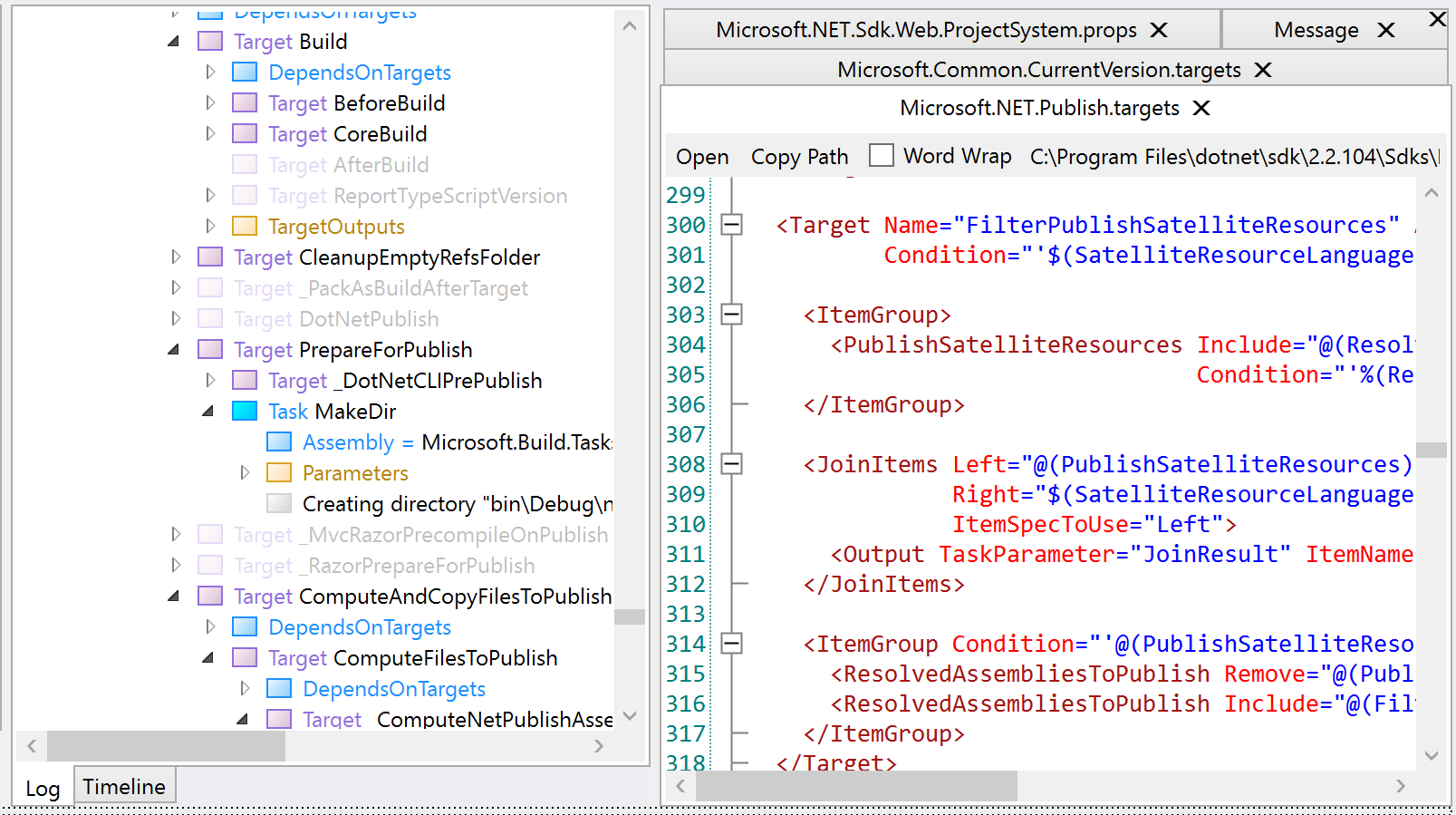
I was trying to debug a dotnet publish operation on an ASP.NET Core project recently and becoming irrational after staring at MSBuild log files for too long. MSBuild does all the heavy lifting in dotnet publish and build operations. That’s when I discovered the MSBuild Structured Log Viewer from Kirill Osenkov. You can install the viewer from http://msbuildlog.com/.
In the end I was fighting a battle over $(DefaultItemExcludes) during publish and trying to find the right target to override and "fix" the property. Even the simplest builds are complicated these days, with implicit imports for .prop files, hundreds of properties, and dozens of tasks. Trying to figure the order of execution by looking at individual .csproj and .targets files is impossible.
MSBuildLog provides a tree view of all the targets that are executing, and provides the properties and items in effect for each step. The search feature is excellent and usually the best way to navigate into the tree, if you have an idea of what you are looking for.
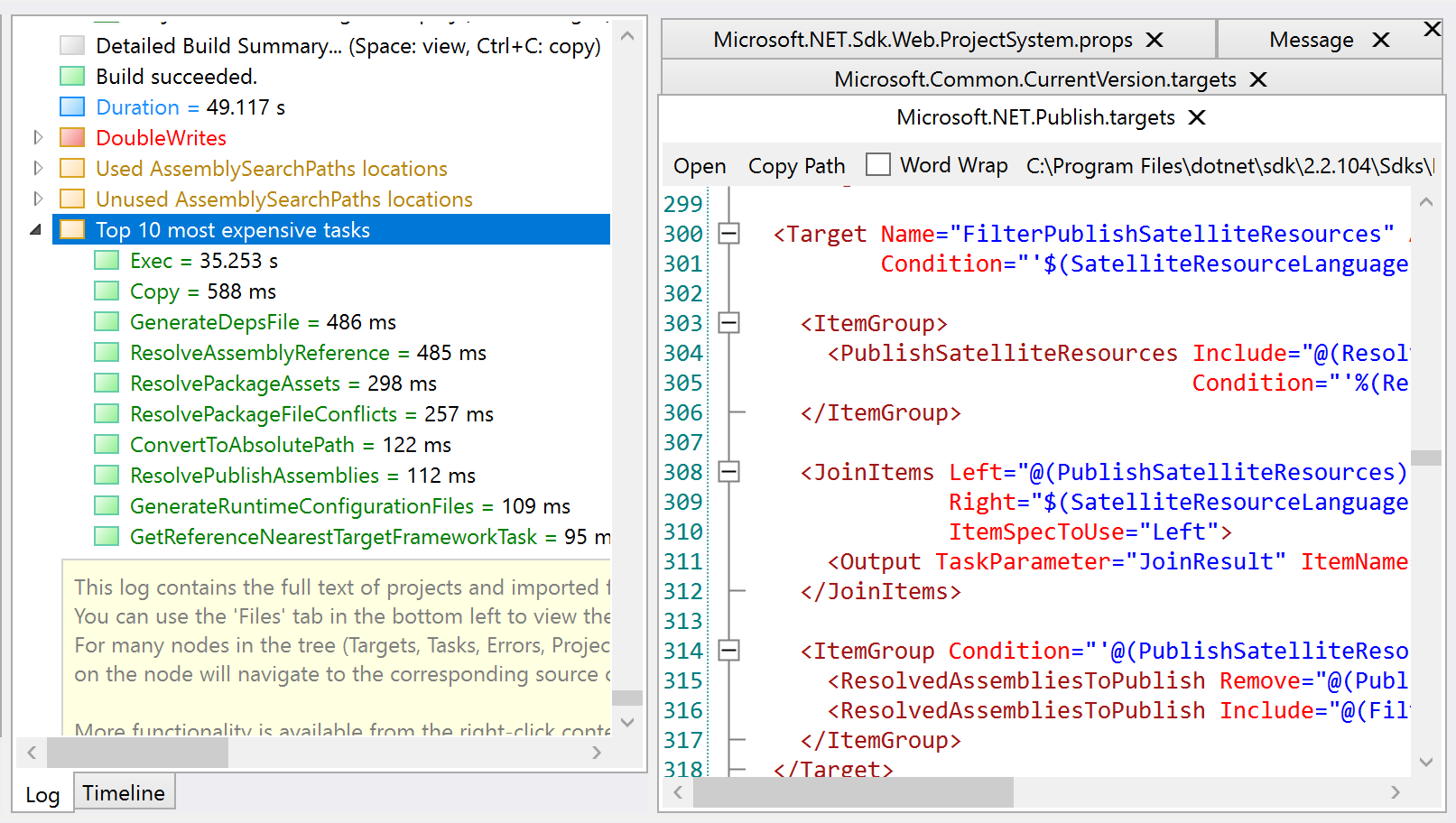
The tool also provides a list of the slowest build tasks, which these days always has Exec tasks calling out to Node or npm at the top of the list.
Microsoft added async features to the C# language with more than the usual fanfare. We were told async and await would fundamentally change how .NET developers write software, and future development would be async by default.
After awaiting the future for 7 years, I still brace myself anytime I start working with an async codebase. It is not a question of if, but a question of when. When will async let me down and give me a headache?
The headaches usually fall into one of these categories.
Last fall I was working on a project where I needed to execute code during a DocumentProcessed event. Inside the event, I could only use async APIs to read from one stream and write into a second stream. The delegate for the event looked like:
public delegate void ProcessDocumentDelegate(MarkdownDocument document);
If you’ve worked with async in C#, you’ll know that the void return type kills asynchrony. The event handler cannot return a Task, so there is nothing the method can return to encapsulate the work in progress.
The bigger problem here is that even if the event handler could return a Task, the code raising the event is old code with no knowledge of Task objects. I could not allow control to leave the event handler until my async work completed. Thus, I was facing the dreaded "sync over async" obstacle.
There is no getting around or going over this obstacle without feeling dirty. You have to hope you are writing code in a .NET Core console application where you can hold your nose and use .Result without fear of deadlocking. If the code is intended for a library with the possibility of execution in different environments, then the saying abandon hope all ye who enter here comes to mind.
When working with an old code base you can assume you’ll run into problems where async code needs to interact with sync code. But, the situation can happen in new code, and with new frameworks, too. For example, the ConfigureServices method of ASP.NET Core.
public void ConfigureServices(IServiceCollection services)
{
    // ...
}
There are many reasons why you might need async method calls inside ConfigureServices. You might need to obtain an access token or fetch a key over HTTPs from a service like Key Vault. Fortunately, there are a few different solutions for this scenario, and all of them we move the async calls out of ConfigureServices.
The easiest way out is to hope you are using a library designed like the KeyVault library, which moves async code into a callback, and invokes the callback later in an async context.
AuthenticationCallback callback = async (authority,resource,scope) =>
{
    // ...

    var authResult = await authContext.AcquireTokenAsync(resource, credential);
    return authResult.AccessToken;
};

var client = new KeyVaultClient(callback);
Another approach is to move the code into Program.cs, where we finally (after waiting for 2.1 releases of C#) have an async Main method to start the process. Finally, you can use one of the approaches described in Andrew Lock’s three part series on Running async tasks on app startup in ASP.NET Core.
The Task class first appeared in .NET 4.0 ten years ago as part of the Task Parallel Library. Task was an abstraction with a focus on parallelism, not asynchrony. Because of this early focus, the Task API has morphed and changed over the years as Microsoft tries to push developers into the pit of async success. Unfortunately, the Task abstraction has left behind a trail of public APIs and code samples that funnel innocent developers into a pit of weeping and despair.
Example - which of the following can execute compute-bound work independently for several minutes? (Choose all that apply)
new Task(work);

Task.Run(work);

Task.Factory.StartNew(work);

Task.Factory.StartNew(work).ConfigureAwait(false);

Task.Factory.StartNew(work, TaskCreationOptions.LongRunning);
Answer: all of the above, but some of them better than others, depending on your context.
Another disappointing feature of async is how good code can turn bad when using the code in an async context. For example, what sort of problem can the following code create?
using (var streamWriter = new StreamWriter(context.Response.Body))
{
    await streamWriter.WriteAsync("Hello World");
}
Answer: in a system trying to keep threads as busy as possible, the above code blocks a thread when flushing the writer during Dispose. Thanks to David Fowler’s Async Guidance for pointing out this problem, and other subtleties.
After all these years with tasks and async, there are still too many traps to catch developers. There is no single pattern to follow for common edge cases like sync over async, yet so many places in C# demand synchronous code (constructors, dispose, and iteration come to mind). Yes, new language features, like async iterators, might shorten this list, but I’m not convinced the pitfalls will disappear. I can only hope that, like the ConfigureAwait disaster, we don’t have to live with the work arounds sprinkled all through our code.
Someone asked me why dependency injection is popular in .NET Core. They told me DI makes code harder to follow because you never know what classes and objects the app will use unless you run with a debugger.
The argument that DI makes software harder to understand has been around for a long time, because there is some truth to the argument. However, if you want to build flexible, testable, decoupled classes in C#, then using a container and constructor injection is still the simplest solution.
The alternative is to write code like the ASP.NET MVC AccountController (not the .NET Core controller, but the MVC 4 and 5 controllers). If you've worked with the framework over the years, you might remember a time when the project scaffolding gave us the following code.
public AccountController()
  : this(new UserManager<ApplicationUser>(
      new UserStore<ApplicationUser>(
       new ApplicationDbContext())))
{
}
then
public AccountController(UserManager<ApplicationUser> userManager)
{
   UserManager = userManager;
}

public UserManager<ApplicationUser> UserManager { get; private set; }
The two different constructors do provide some flexibility. In a unit test, you can pass in a test double as a UserManager, but when the application is live the default constructor combines a DbContext with a UserStore to provide a production implementation.
The problem is, the production implementation becomes hard-coded into the default constructor. What if you want to wrap the UserStore with a caching or logging component? What if you wanted to use a non-default connection string for the DbContext? Then you need to scour the entire code base to find all the dependencies hardcoded with new.
Later versions of the scaffolding tried to improve the situation by centralizing dependency registration. The following is code from today's Startup.Auth.cs. Notice how the method is similar to ConfigureServices in ASP.NET Core.
public void ConfigureAuth(IAppBuilder app)
{
    // Configure the db context, user manager and
    // signin manager to use a single instance per request
    app.CreatePerOwinContext(ApplicationDbContext.Create);
    app.CreatePerOwinContext<ApplicationUserManager>(ApplicationUserManager.Create);
    app.CreatePerOwinContext<ApplicationSignInManager>(ApplicationSignInManager.Create);

    // ...

}
While the central registration code is an improvement, the non-Core ASP.NET framework does not offer DI as a native service. The application needs to manually resolve a dependencies via an OwinContext reference. Now, the AccountController looks like:
public AccountController()
{
}

public AccountController(ApplicationUserManager userManager)
{
   UserManager = userManager;
}

public ApplicationUserManager UserManager
{
   get
   {
   return _userManager ?? HttpContext.GetOwinContext().GetUserManager<ApplicationUserManager>();
   }

   private set
   {
       _userManager = value;
   }
}
The problem is, every dependency requires a developer to write a property and follow the service locator anti-pattern. So, while the indirection of DI in ASP.NET Core does have some downsides, at least DI doesn’t add more code to a project. In fact, an AccountController in ASP.NET has a simpler setup.
public class AccountController
{
    public AccountController(ApplicationUserManager userManager)
    {
        UserManager = userManager;
    }

    // …

}
As always, software is about tradeoffs. If you want the flexibility of testable classes, go all in with dependency injection. The alternative is to still face uncertainties from indirection, but in a code base that is larger and harder to maintain.
My trip to the Software Design and Development conference came only a few days after returning home from NDC Minnesota, so I should have written this post 6 months ago. Life took some unexpected turns, so better late than never.
History
My first SDD was over 10 years ago. The opportunity came about when the Pluralsight founders opted to step out of the conference circuit and encouraged myself and others to step in. Back then the conference ran under a different name, but the organizer and the feel of the conference hasn't changed. Both are some of my favorites.
On all my trips to London I’ve always arrived on an overnight flight from Washington D.C. For this trip I took a daytime flight, leaving Washington at 9 am and reaching a dark and rainy Heathrow at 9 pm. I was bored with overnight flights into Europe and hoped the shift would allow me a quicker adjustment to the time change (it did).
I’ve always found London to be comfortable and familiar. I grew up in an old house by American standards, in an old town and near the older east coast cities. In the black cab from Paddington station, at night and in the rain, the Georgian architecture of London made me feel like I was riding through Northwest D.C. The terraced housing passed by like row houses in Baltimore. The smell of old wood near the river, and the Sunday roast. These are childhood experiences. London is closer to home than Chicago or Seattle.


If I’m ever in London when a cyclone hits, I’ll want to be at the Barbican Centre, the usual home for SDD. The brutalist architecture of the surrounding estate places concrete beneath your feet, above your head, and around you on all four sides. Razed to the cellars by bombs during World War II, the area today lives up to the old Latin meaning of the word barbican, which implies a residence that is “well-fortified”.


The first day of SDD for me was a C# workshop. It’s been a long time since I’ve taught a pure language workshop, and the experience was wonderful. In recent years, my workshops revolved around Angular. In December of 2017, after running an Angular workshop at NDC, I made the decision to escape from the asylum. I didn’t want to work with Angular, and I was tired of teaching students how to shave yaks. I especially didn’t want to shave my own yaks only to hear them bleat WARN deprecated with breaking changes the following week. In this workshop, I felt rewarded by teaching topics with significance in software development, and showed how to use patterns with staying power.
My final session at SDD was one of the most enjoyable sessions I’ve presented in a few years. I was able to open an editor and vamp on a .NET Core web app for 90 minutes. This type of presentation doesn’t work as a keynote, or in front of a huge audience, but on this day I had the perfect room and time slot.
Before I arrived in London, I knew I would eat well during the week. Brian Randall was also speaking at the conference. No matter where I am in the world, I can call Brian, tell him what city I’m in, and he’ll have restaurant recommendations. When I’m in the same city as Brian, the culinary adventures are fantastic. Highlights from the past include Vivek Singh’s Cinnamon Club (in London), Bobby Flay’s Mesa Grill (in New York city at the time), and a couple dozen other fine restaurants over the years.
The SDD organizer, Nick Payne, is also a foodie. Nick organizes a speaker’s dinner every year, and not only does the restaurant exceed expectations, but the company and conversation does, too. This years dinner was at Rök, a restaurant with a rural Nordic influence in the décor, as well as the food.
This year’s highlight, though, was the Duck and Waffle. There’s only three buildings in all of London that can look down at The Gherkin, and the Duck and Waffle is at the top of one of those buildings. Brian and I had breakfast here one morning, and yes, the duck leg confit was tasty. The views, however, were breathtaking. There's a chill of insignificance that settles over me when I'm looking over the sprawl of 8 million people. Fortunately, breakfast day was a rare sunny morning in London. The warmth of the sun was a good counterbalance.



As much as I enjoy London, though, I had to cut this trip short. Wall Street beckoned.
Up next in this travel series: Pluralsight IPO day.

 OdeToCode by K. Scott Allen
 Subscribe
 Twitter
 Search
 About
About
 Learn C#