
After a 12-month break from developer conferences, I'm looking forward to working with a small handful of conferences next year. I've been kicking around some ideas for topics I’d like to talk about, and I'm sharing those ideas because thoughts and feedback are always appreciated!
One of the challenges you’ll face when building applications in the cloud is in choosing the best technologies for your solution. In this session we’ll take a broad look at the technologies, services, and infrastructure available in Azure while drilling into the vital details you need to make decisions. What’s the best host for my container-based solution? Should I place my data into a data lake, a data warehouse, or a simple blob container? What’s the essential difference between a message queue and an event hub? We’ll answer these questions while also covering topics like security, identity, governance and compliance.

Big data meets .NET with Apache Spark, the analytics engine for large-scale data processing. If you are a .NET developer and you need to create an ETL process for high volumes of data, or process large streams of data in real time, or train machine learning models against a big data set, or explore big data sets with exploratory queries, then Apache Spark is a technology you should know about. Once we’ve seen how to setup an Apache Spark cluster and worked with the shell, we’ll dive into the .NET bindings for Spark and see how to query and analyze data using C#, F#, and SQL. We’ll also be looking at Azure’s DataBricks platform to work with Spark in a managed environment.

If you’ve ever wondered what makes MSBuild work, or if you’ve ever needed to tweak the XML in a project file to allow your software to compile, then this session is for you. We’ll start by learning about the fundamental concepts in MSBuild, concepts like tasks, properties, and conditionals. We’ll then move into the details of build targets that drive most of today’s builds. This talk is based on years of experience in being the person who everyone uses to debug builds, so there will be no shortage of tips and tricks for managing and debugging your builds.

Leadership skills come naturally for some people, but for the rest of us we need to figure out leadership as we go along. If you are thinking of making the jump from being a technical contributor, or have your sights set for the chief technical position, this session will give you some insight and lessons learned from experiences on the job.

At NDC Olso I was part of a panel discussion with Julie Lerman, David Fowl er, Damian Edwards, and Bryan Hogan. Here are my stream of consciousness answers for some of the questions presented to the panelists. Not all the questions were directed to me, but I jotted down some thoughts nonetheless.

This might sound odd, but I’m excited about WPF and Windows Forms. It’s not that I want to go out and write a new application using WinForms. But, I have a WinForms application that is still in production and is old enough to graduate from high school. I feel good knowing that Microsoft recognizes the importance of these older frameworks and the importance of writing desktop applications. For some scenarios, desktop applications are easier to build than web applications, and for the first time in more than 5 years I feel like .NET supports the desktop.
I’m also excited about gRPC services in ASP.NET Core. I think the enterprise struggles with the alternatives to WCF and SOAP. REST and hypermedia work well for some services and applications, but there are many scenarios where you need to bang out a distributed service and don’t need the overhead of perfectly decoupled components. In other words, HTTP and JSON are great, but the old days of “Add Service Reference” aren’t as bad as many people make them out to be. Like it or not, SOAP and WS-* protocols still perform significant amounts of work in today’s world. I believe gPRC can be a better SOAP.

My favorite new API is Math.FusedMultiplyAdd. The operation sounds like something you might need in the software for a thermonuclear simulator. It’s fast, and it’s accurate! Be careful!
I think EF needs to expand its reach far beyond relational databases. I know EF Core 3 is going to support CosmosDB, but its taking a long time to get there, and I already have good abstractions I can use in the Cosmos DB SDK, so I don’t need EF there.
It’s funny, ten years ago I considered relational databases to be the only way to store data. Then I started using MongoDB in real applications and I started to see all the alternatives. Today, I think of relational databases as specialized high-end storage for specific use cases. The bulk of my data, in terms of both volume and processing, lives outside of a SQL database. The data is in blob storage, and in data lakes, and is streaming through event grids, and getting crunched in Apache Spark clusters. That’s where I need help with data.
I think the best thing EF could do moving forward is to split into two frameworks. One part of the framework could map data from CSV files and JSON payloads into CLR objects as quickly as possible. But, I don’t want just an object mapper in the AutoMapper sense, I also want something similar to an F# type provider for C#. I want to point to data in an Azure data lake or an event grid stream and then express my computations using strong types.
The other part of the framework could focus on sending commands and queries to a remote data source for processing. Currently, EF translates LINQ expressions into SQL, but I think we need to give up on the dream of LINQ to everything. It takes too long for EF to support new databases, like ComosDB. It takes EF too long to support common features of a single database, like views and stored procedures in SQL. What we need is an EF that allows developers to use native data processing languages in straightforward fashion. Give me an elegant way to embed SQL statements in my code. SQL is everywhere! SQL is a language supported by SQL Server, by Cosmos DB, by Apache Spark, and in the future even blob storage in Azure. I need to take advantage of as many SQL features as I can without being limited by what can be expressed in C#, and then I need to execute the SQL and map results into objects.
In short, I want better language interop and forget about abstracting heterogeneous data sources behind C# expressions.

I do worry. I’m worried about people getting left behind, and I’m worrying about people getting confused and giving up. A couple of years ago I made a deliberate move away from front-end development because I felt the pace of change was unhealthy. It felt like everything was changing, but not getting better. The improvements were small and not worth the cost of keeping up to date. I always use webpack 4 as a specific example. There were many breaking changes between version 4 and version 3. For example, loaders were removed and replaced by rules. From what I could tell, rules don’t offer any features beyond loaders, but everyone moving from webpack 3 to webpack 4 starts with a broken webpack build because of the change, and they need to research the change and find out how to update their webpack configuration.
I think .NET and the C# language are both changing, and I do believe they are moving forward, they are improving, and they are not just changing to make a change. But, I do worry that Microsoft doesn’t keep backward compatibility as a priority anymore. I know that backward compatibility can be an albatross and there’s been a lot of bad decisions made in the name of backward compatibility, but I also know I’m not pushing my team to update their ASP.NET Core 1.1 applications because of all the breaking changes in moving to 2.2. We’ll need to move eventually, but there’s nothing forcing us to move today except for the end of support coming in a few weeks. We’ll have to set aside a couple days to make the move and figure out the new package names, the new extension method namespaces, the new name for the web host builder, and how to configure the new authentication and authorization services and middleware. Then we have to run some tests and make sure we have no regressions in performance, features, or security. Upgrading is not just setting a version property in a project file, sometimes you need to learn about the philosophy changes in the framework.
Yes, I do. Just last month I was working with a development team that made it clear from the start that this team uses a DBA, and the DBA is going to be solely responsible for writing all SQL queries for the database.
It is a reasonable decision to avoid the Entity Framework, and there are many reasons you can use to justify this decision. I only ask teams to avoid EF for the right reasons. Don’t avoid EF because you think EF is insecure. I’d bet EF does a better job avoiding SQL injection attacks than hand rolled code. Don’t avoid EF because you think EF will be slow, there are many scenarios where EF is fast enough.
If .NET includes the C# language, too, the first thing I’d rip out and redo is async and await. We need async programming models, but the current solution is fragile and frustrating. I don't like the Async postfix convention in my codebase. I don’t want to see ConfigureAwait in my library code. I don’t want to worry about running sync code over async code or async code over sync code. We need better operability because here we don’t always have perfectly async code bases and libraries.
What I’m saying is – I want to call Task.Result and not feel dirty or fearful.
For anyone who hasn’t heard of Ballerina, go visit ballerina.io. I worry about baking Ballerina type features into the language because I’m afraid we’ll end up with something like async and await where the solution covers 80% of the easy scenarios, but the last 20% is painful or near impossible.
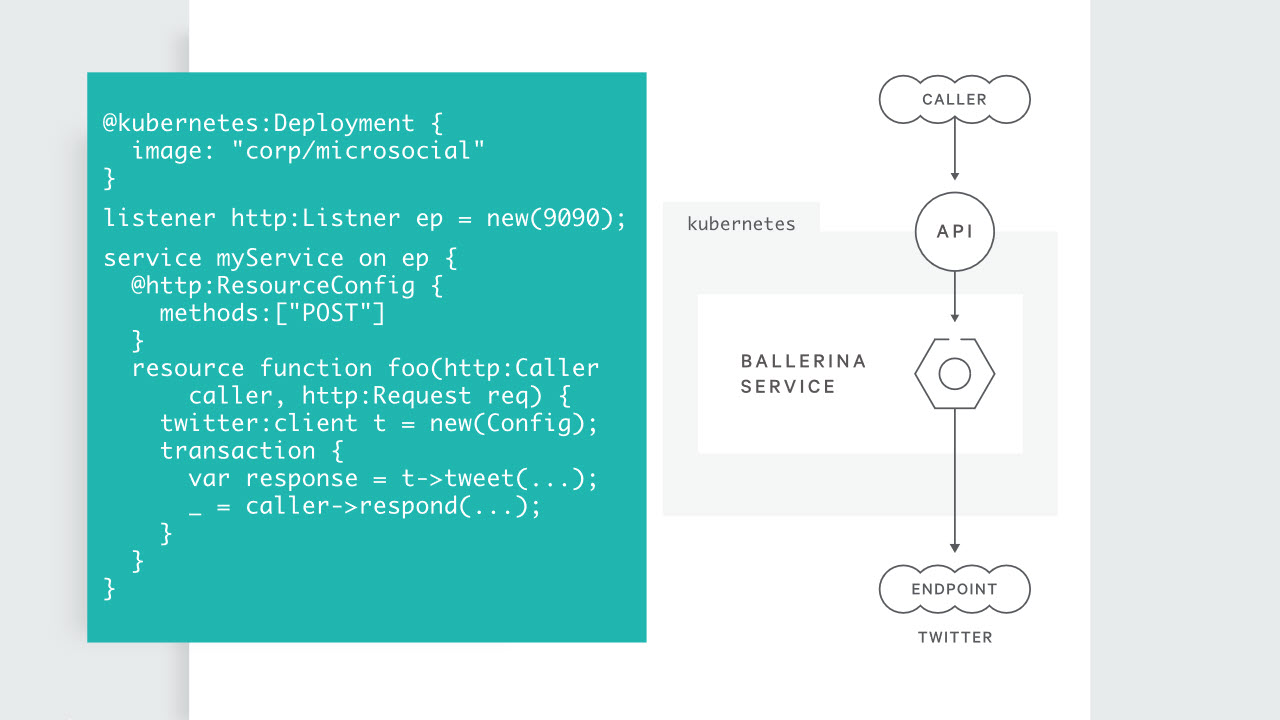
Like it or not, C# is a general purpose programming language, so you are going to have scenarios that require boilerplate code. I do think we can make some changes to the language that can help eliminate boilerplate code. Every time I look at a project that generates Swagger docs or OpenAPI docs, there are these [Produces] attributes all over the code. The attributes are noisy and I always wonder why the tools can't figure out the real return type.
Or, better yet, why can’t the language express what I’m going to return? C# is an object oriented language so I need to write methods with a return type like IActionResult to cover all possible return types. But, IActionResult loses all the fidelity you can have with the concrete types the method actually uses. What if C# had the F# concept of a sum type, or discriminated union? Then I don’t have to lose type fidelity by specifying a return type with some base class or interface. I think changes like this would make C# and then .NET appeal to an even broader audience.
I also think .NET and the tools can continue to improve for the new world of microservices. Look at what’s happened with HttpClient over the years. The original version was impossible to use correctly, because you had to choose between network socket starvation on one hand, and infinite DNS cache lookups on the other. So, we need smarter bits of infrastructure, and we need better scaffolding tools. The scaffolding tools with MVC 5 are light years ahead of the tools in ASP.NET Core in terms of features and performance.
Thanks for reading, and thanks to every who came to see the panel live!

I've been in the guts of an ASP.NET MVC 5 application lately and have some more perspective on the improvements we take for granted in ASP.NET Core.

Tag helpers are far easier to read and write compared to HTML helpers. There were days when I wanted to give up on Razor views, but tag helpers make the Razor engine second to only JSX in terms of smoothness. Of all the different techniques I've used to dynamically generate HTML, JSX and TSX are by far my favorites, and I think that’s because JSX took the approach of embedding the declarative language inside the imperative language (HTML inside of JavaScript). Embedding in the other direction, as Razor and others have done (language X inside of HTML), always seems to create scenarios with awkward syntax.
It is refreshing to work with a framework that embraces dependency injection, like ASP.NET Core. ASP.NET MVC danced around DI and provides a hook for a central dependency resolver, but you always have to wonder if something might not work because you’ve strayed outside the lines.
The artificial separation between ASP.NET MVC and the ASP.NET Web API was unfortunate and unpleasant, but follows Conway’s law.
The startup logic for an ASP.NET MVC application is difficult to follow. There is code in global.asax and three or four other files in the App_Start folder. I haven’t been a big fan of how ASP.NET Core applications organize startup logic (see opinion 7 and 10), but even the worst examples are far better than the MVC approach.
Applications built before attribute routing was popular have the worst API routes.
Front end builds were easy and fast when all you had to do was bundle and minify jQuery and a few other files.
The scaffolding tools in MVC 5 are far ahead of the scaffolding tools for ASP.NET Core. Not only are the older tools considerably faster, but they tend not to throw exceptions as often as the ASP.NET Core tooling. Hopefully, ASP.NET Core will catch up.
My latest Pluralsight course, released last week, is Migrating Applications and Services to Azure with Visual Studio 2019. The course is similar to my getting started course for .NET developers on Azure, but leverages more tools in Visual Studio. 
Enjoy!
Let’s say you have the following authorization policy defined in the Configure method of your ASP.NET Core’s Startup class.
.AddAuthorization(options =>
{
    options.AddPolicy("IsLucky", builder =>
    {
        var random = new Random();
        builder.RequireAssertion(_ => random.Next(1, 100) < 75);
    });
})
This policy will grant access about ¾ of the time. It is easy to apply the policy to a controller or Razor page using the Authorize attribute.
[Authorize(Policy = "IsLucky")]
public class SecretsModel : PageModel
{
      // ...
}
But, what if you want to imperatively check the policy? For example, when building a navigation menu, you want to know if the user will be able to perform a given action or reach a specific resource before displaying links and command buttons in the UI. In this scenario, ask for an IAuthorizationService type object in any controller or Razor page. The auth service combines a claims principal and a policy name to let you know if the user authorization check succeeds.
For example, in the page model for a Razor page:
public class SecretsModel : PageModel
{
    public bool IsLucky { get; set; }
    private readonly IAuthorizationService authorization;

    public SecretsModel(IAuthorizationService authorization)
    {
        this.authorization = authorization;
    }

    public async Task OnGet()
    {
        var result = await authorization.AuthorizeAsync(User, "IsLucky");
        IsLucky = result.Succeeded;
    }
}
And then in the page itself:
@if(Model.IsLucky)
{
    <div>You got lucky!</div>
}
else
{
    <div>No luck for you :(</div>
}
Of course, having an authorization policy that uses a a random number generator is weird, but I'm hoping to work it into a "random access" policy joke someday.
Speaking of Pluralsight, I released an update to my C# Fundamentals course in April and I'm just now catching up with the annoucement. The course is focused on the C# language, but I decided to use .NET Core and Visual Studio Code when recording the update. Now, you can follow along on Windows using Visual Studio, but you could also follow along on Linux or macOS using any text editor. If you are looking to learn C# and some object-oriented programming techniques, I designed this course for you!

I have a difficult time stating that I left London early to reach New York City in time for a pre-IPO party without laughing at the gaudiness of it all. However, that’s what I did just over one year ago.
My Pluralsight story begins at a Visual Studio Live! Conference in 2007 when I met Fritz Onion in a speaker’s prep room. Fritz knew me from writing and blogging, and, eventually, our first meeting led me doing a "test teach" for Pluralsight.
A "test teach" is a short tryout involving real students, but it was more than just a check on my speaking ability. I believe the "test teach" evaluated several soft attributes. Could I build a rapport with the students? Do I handle questions well? Can I socialize at lunchtime? Can I successfully arrange and coordinate travel on my own to reach the customer? It’s one thing to plan a trip to visit a tourist attraction where signs and strangers would help you along the way. Planning a trip to arrive at a nondescript office building in a generic business park of Jersey City at a very specific time requires more expertise [1].
The test teach went well, and now I'm on a plane into Newark. Over the last 10 years I've taught dozens and dozens of classes all around the world for Pluralsight. I've made over 50 video courses for Pluralsight.com. The company is ready to go public, and I've been invited to the opening bell ceremony!
I’ve never been on a car ride into the city. I’ve always arrived on a plane, or underground on a train. But on this trip, I arranged for a driver to take me from Newark Airport to the W hotel in Times Square. It was my first time in a car through the Holland tunnel, and with all the traffic into the city at 7 pm, I had plenty of time to study the tunnel. The night was dark, wet, and foggy. New York had put on its Gotham city look, and I was waiting for the Batmobile to zoom past using an invisible traffic lane.

The pre-IPO dinner party was at Estiatorio Milos, a Greek seafood restaurant on 55th street. Milo’s food was okay. The place had the feel of an upscale restaurant designed to extract as much coin as possible from patrons while giving those same patrons the ability to brag to everyone about eating fish flown in fresh from the Mediterranean. Form over function. The company and festive atmosphere were better than the food. I joined late but found a seat among other authors, including Joe Eames, Deborah Kurata, and John Sonmez. Although there was talk of an after-party involving an ultimate milkshake, being on UK time, I needed sleep before the big morning.

Times Square in New York is an astounding place. Bright lights, tall buildings, and a mass of humanity moving through the streets. The ads are so intense they lead to sensory overload. There are animated ads for movies, which want to take your money in exchange for laughs. A four-story jewelry ad wants you to trade money for diamonds. Underwear, outerwear, phones, hotels, and banks all project images in a quest for branding and customers.

There was a time when I would have dismissed the square as being too artificial. But, after reading A Splendid Exchange, I’m seeing Times Square as a primal center of trade, and a natural expression of what humans have been doing for centuries. It is the place where humans come to make exchanges.

When we leave the hotel the morning of the IPO, the exchange we are looking for is the NASDAQ exchange on 4 Times Square. The NASDAQ is hard to miss thanks to the 7-story curved LED display outside. In fact, this NASDAQ location is really more of a media center than an exchange. The place has television studios inside, and rooms with hundreds of cameras where companies doing an IPO can ring the opening bell and look like they are on the trading floor surrounded by “traders” working diligently in front of computer monitors. The physical NASDAQ trading market exists only in silicon and fiber optics.
I’m one of only six or so authors who’ve been invited to be present for the IPO. There is also 50 or more Pluralsight employees, board members, and investors. A few of the people I’ve known for years and grown fond of. But with Pluralsight’s rapid growth, the majority are strangers to me. Nevertheless, we are bonding together like molecules in a high-energy physics experiment. I’m barely through the security entrance when Gene Simmons walks out of a TV studiio. He saunters over to 4 of us gawkers and in a Gene voice says, "So ... what are you gentlemen here to sell today?"

You’ve never felt like a true nerd until you tell Gene Simmons about your training videos covering software development. It is impossible to perform this task without sounding like the D&D dungeon master at the corner table of a comic book store.
During an IPO, there are two significant moments. The first moment is the opening bell ceremony. Not every company will choose to participate in the ceremony, but I'm glad Pluralsight did. For this ceremony, everyone gathers on the stage in a circular room. In the room there are dozens of electronic displays hanging from the wall, and even more cameras. The cameras cover every possible vantage point on the stage. There’s a podium on the stage, and NASDAQ people walking around wearing headsets, carrying clipboards, and giving orders with all the authority of a television producer. In the moments leading up to the 9:30 am market opening, they are giving us pep talks and telling us the more we clap and yell, the better we'll look on TV. I'm a bit worried that if we manage to add more energy to the room, we will start a chemical reaction that lays waste to the entire building.

At 9:30 am, the person at the podium (Aaron, in this case), takes a cue, pushes a button, and the bell rings. Confetti begins to fall. There’s yelling, clapping, and arm raising. I think of my parents. I wish they were still alive to see this moment. I’m one parental memory away from losing it and crying all over the stage. I can’t ever remember euphoria and sadness being mixed like this.
After the opening, there is professional picture taking, both inside the building, and outside in Times Square. There's also champagne, and singing and laughing, and selfies. Lots of selfies.

The next big moment on IPO day comes when the first share of stock is publicly traded. I don’t remember the precise moment when this happened, but I think it was about an hour or 90 minutes later. There’s a roar when the price of the first trade execution hits the screens. There’s hugging, handshakes, and back-slapping. More selfies, lots of selfies.

And then ... dispersion.
We leave the studios and head back to the hotel. Most Pluralsight employees are flying out in the afternoon to be back in Utah the same day. I’m beginning to think that if my driver can come early, I’ll get through the tunnel before rush hour hits and catch an earlier flight home. Flights between D.C. and Newark go once an hour when the schedules are working. If I can't catch an earlier flight, maybe I'll take the train. Either way, it’s not even lunchtime and I’m exhausted.
In the end, I did catch an early flight. However, before I left, I had a quiet celebration with a meal worthy of a billion-dollar IPO. I had a $5 hot pastrami sandwich from a street vendor two blocks from Times Square.
Function over form.
[1] Years ago, a renowned training company approached me about teaching a Web API class at Microsoft. For my first class, I was given a location on the Microsoft campus and told a Microsoft employee would be there to let me in the classroom. I arrived 30 minutes early and began waiting for my Microsoft escort to arrive. With 15 minutes left before the class started, I started emailing and trying to reach people at the training company to let them know my escort wasn't arriving. The classroom was in a locked down section of the building, and I wasn't getting past the entrance without my escort.
Finally, as my escort arrived 2 minutes before the class began, I entered the room in a state of panic. As I was setting up, I noticed that one of the well known instructors from the training company was sitting in the front row of the class. He was directly in front of my podium, and I heard him say, into his phone, "looks like he finally made it." I didn’t have time to think much of the statement at the time, as I only wanted to get plugged in and take a couple of deep breaths before launching into an all-day technical workshop for 70 MS engineers.
Later, when I replayed the opening events in my mind, I was furious. Why didn’t someone let me know he’d be there? Why did no one respond to my calls? Why couldn’t he provide me with an escort? After that experience, I think I finished one or two more classes for this training company that we had already arranged, and then I let the relationship expire quietly.
I tell this story because Pluralsight has always treated me with respect, and that's one reason I've been loyal and stuck with them.

 OdeToCode by K. Scott Allen
 Subscribe
 Twitter
 Search
 About
About
 Learn C#