
In a previous post, I suggested you think of your ASP.NET Core application as a command line tool you can use to execute application specific tasks. In an even earlier post, I suggested you keep scripts related to development checked into source control. I think you can see now how these two posts work together to make everyday development tasks automated and easy.
The command line renaissance gives us a wide range of tools we can use to speed up .NET Core development. Here are some of the tools I've been using recently, in no particular order:
Various dotnet global tools, including dotnet-cake, dotnet-t4, and dotnet-rimraf
The Windows Subsystem for Linux, because it opens up an entire universe of standard tools, like Curl
The Chocolatey package manager

 .
.

There's a new episode of the CLoudSkills.fm podcast available, and the episode features yours truly!
In this episode I talk with Scott Allen about building and running applications in the Azure cloud. Scott is a legendary software developer, conference speaker, trainer, and Pluralsight author.
I hope you enjoy the show.
There are hundreds of performance testing tools for the web. The tool I’ve been using the most for the last 10 years is a part of the web test tools in Visual Studio. Microsoft officially deprecated these tools with the 2019 release. The deprecation is not surprising given how Microsoft has not updated the tools in 10 years. While the rest of the world has moved web testing to open standards like JSON, HAR files, and interoperability with developer tools in modern browsers, the VS test tools still use ActiveX controls, and require Internet Explorer.
Steve Smith recently asked VS Users what tool they plan on using in the future.

In the replies, a few people mentioned a tool I’ve been experimenting with named K6.
You can install K6 locally, or run K6 from a container. The documentation covers both scenarios. In addition to the docs, I’ve also been reading the Go source code for K6. I’ve had a fascination with large Go codebases recently, although I think I’m ready to try another new language now, perhaps Rust or Scala.
There were a few features of the Visual Studio test tools that made the tools useful and easy. One feature was the test recorder. The test recorder was an ActiveX control that could record all the HTTP traffic leaving the browser and store the results into an XML file. The recorder made it easy to create tests because I only needed to launch IE and then work with an application as a normal user. Although XML isn’t in fashion these days, the XML format was easy to modify both manually and programmatically. The tools also offered several extensibility points you could hook with C# for pre and post modifications of each request.
K6 also makes test creation an easy task. Any browser that can export a HAR (HTTP archive) file can record test input for K6, and the developer tools of all modern browsers export HAR.

You can modify the JSON HAR file by hand, or programmatically. You can also use K6 to convert the HAR file into an ES2015 module full of JavaScript code.

Here is what the generated code looks like.
group("page_2 - ", function() {
    let req, res;
	req = [{
		"method": "get",
		"url": "https://odetocode.com/blogs/scott/archive/2019/04/04/on-the-design-of-app-launchers.aspx",
		"params": {
			"cookies": {
				".ASPXAUTH": "73..."
			},
			"headers": {
				"Host": "odetocode.com",
				"User-Agent": "Mozilla/5.0 (Windows NT 10.0; Win64; x64; rv:67.0) Gecko/20100101 Firefox/67.0",
				"Accept": "text/html,application/xhtml+xml,application/xml;q=0.9,*/*;q=0.8",
				"...": "..."
			}
		}
	},{
		"...": "..."
	}];

    res = http.batch(req);
	sleep(0.69);

});
There is an entire API available in K6 with extensibility points for cross cutting concerns. With a script in hand, you can now run load tests from k6.

The above run was with a single VU – a single virtual user, but you can add more users and run k6 in a cluster, or in the cloud. In short, K6 has all the features of Visual Studio Load Tests, although with no UI tools for beginners. However, the APIs and command line are easy to use and rely on standard tools and languages. The current Azure load test offerings require either a web test from Visual Studio, or, a single URL for a simple test. Until this Azure story improves to add more sophisticated test inputs, K6 is a tool to keep in the toolbelt.
Every so often I like to wander into user experience design meetings and voice my opinion. I do this partly because I want to fight the specialization sickness that hobbles our industry. I believe anyone who builds software that comes anywhere close to the user interface should know something about UX design.
When it comes to UX, I follow T.S Eliot’s philosophy that good poets borrow, great poets steal. I’m not a good poet or a good UX designer, but I know what I like when I read poetry, and I know what works for me when I use software. I’ll borrow as many ideas as I can. In UX, there’s time for a hundred indecisions, and for a hundred visions and revisions, before the taking of a toast and tea.
I’ve been looking specifically at navigation for platforms that compose themselves from multiple applications. Applications might not be the right word to use, but think about platforms like Office 365, Salesforce, and Google’s GSuite. These are platforms where users move between different contexts. You are reading email, then you are working in a shared document, then you are reviewing a spreadsheet, then video chatting with a coworker.
All these platforms use the 9-dot app launcher icon to jump from one context to another. For example, here’s Office 365.
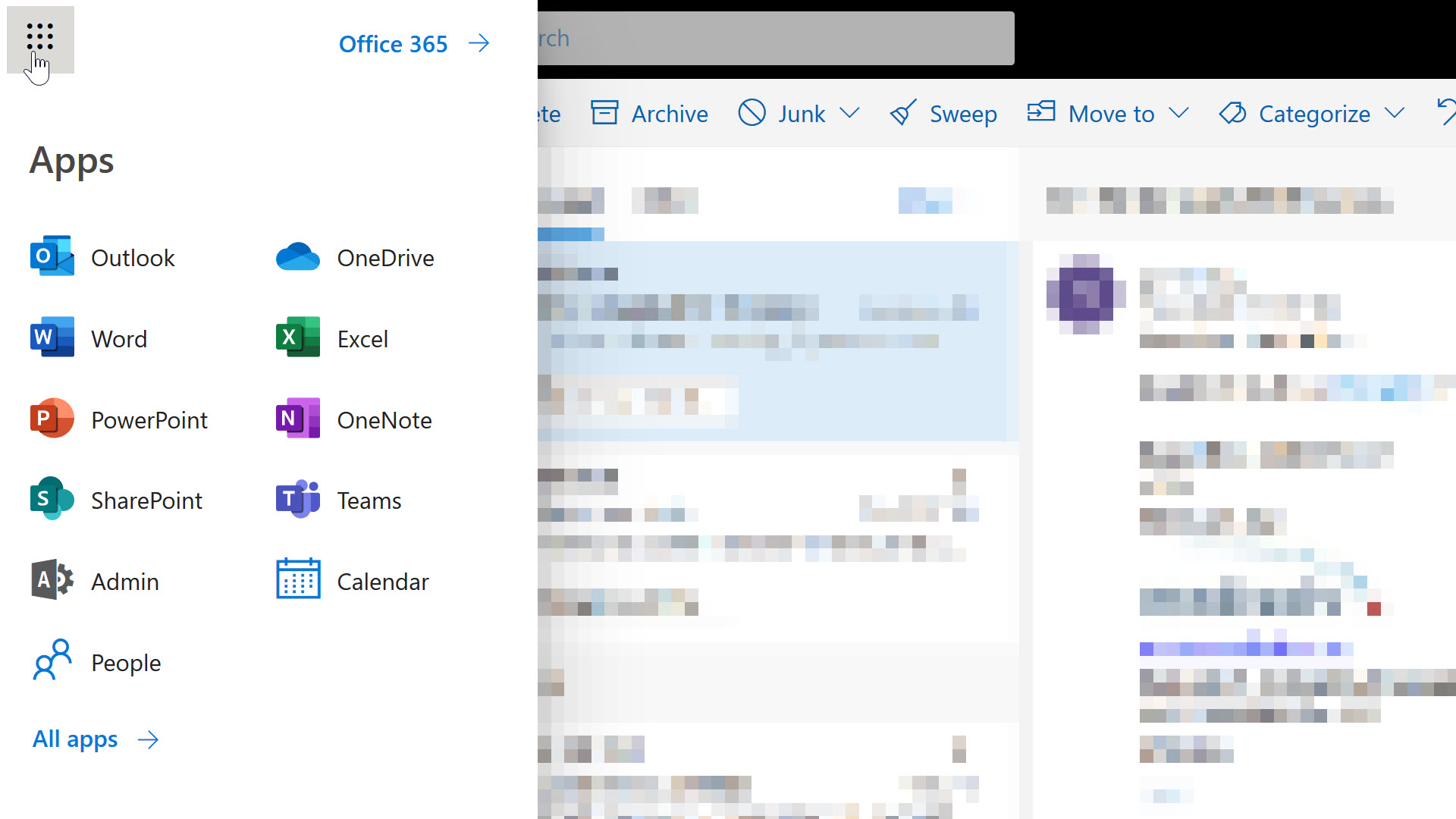
There’s a few guiding principles we might borrow from O365 at first glance.
However, look closely and you’ll see not every entry follows the guidelines. The outliers here are Calendar and People. Long time users of Outlook would know you can access your contacts and calendar without leaving Outlook, but on the web, Microsoft felt it was necessary to highlight these features of the platform from the highest-level navigation menu. The icons for People and Calendar stand out because the graphics are simple and schematic. The text for these entries stands out because the text is not a product name, but a friendly description of the feature you want to use.
Anyone who has ever created content for Microsoft will know how serious Microsoft can be when it comes to product names. I can imagine a war starting inside the company when someone proposed adding People and Calendar to the menu. On one side there are members of the Office team who have promoted the Outlook brand for decades. On the other side are people fighting for the discoverability and usability of the O365 platform.
Knowing Microsoft, the final decision relied on user experience testing, and I’m guessing the tests showed some non-trivial number of users couldn’t find their contacts or a calendar in the O365 UI.
I think software companies tend to overestimate the brand name recognition of their software, particularly when it comes to product suites and platforms with a variety of brands inside. All the pet names are confusing. Many users don’t care to dig into the details of 5 different product offerings. I assert this fact based on anecdotal evidence, like the following thread about the game show Who Wants to be a Millionaire?

That’s Microsoft. What can we borrow from Google?
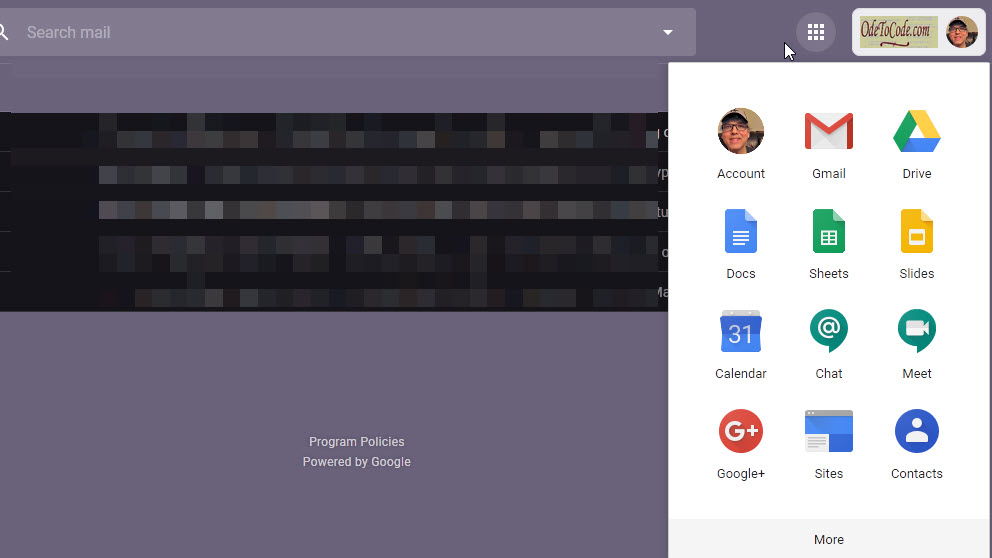
Again, we have the app launcher icon, and a navigation menu with icons and text. The icons are representative, simple, and contain only a touch of shading and nuance. The few brand names that jump out are Gmail, Drive, and the notorious Google+. Most of the entries consist of simple text and icon pairs that work in concert to provide clues about a feature area. For example, the @ icon for Chat suggests a text chat. The camera icon for Meeting suggests a video conference.
What about LinkedIn?
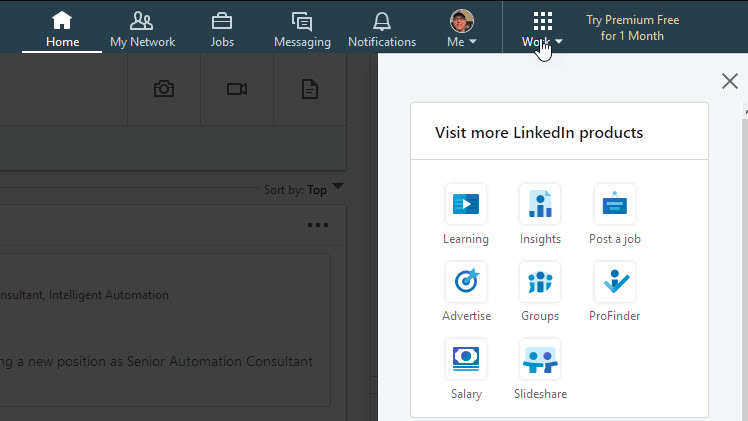
Once again, we see an app launcher opening a collection of icon and text pairs. However, there’s something ... uninspiring about the LinkedIn UI. The monochrome look gives a washed out appearance. There are no distinctive colors to scan for when trying to locate a familiar feature. Each entry is smaller than the entries in O365 and G Suite, and the menu appears unbalanced with the amount of white space it uses. And what are those icons? Groups and Insights are too similar, and the salary icon (an eight-sided nut laying on two sheets of paper?) is too abstract and appears out of focus - an impressive effect for a 40-pixel icon built with SVG.
My criticism of the icons isn’t based solely on some inner sense of aesthetics. There is research from the Nielson Norman Group on icon usability which says icons should be simple, memorable and recognizable. There’s also the basic design heuristics that we should have users rely on recognition, not recall, and that a system should use words and phrases familiar to the user rather than system oriented terms (like abstract product names).
In the end you can borrow ideas from multiple platforms and usability studies to guide the design of an app launcher that works best for your system. Just remember that schematic, recognizable icons and user-friendly text make the most effective launcher.
Everyone should try Visual Studio Live Share. I only had to try the tool once to realize that any other screen sharing and meeting software was not going to be as good as VS Live Share (which works in VS Code, too).
Brice Wilson and I put together a Pluralsight Play by Play on Visual Studio to coincide with today’s launch of Visual Studio 2019. It’s a quick video with loads of demos, including how to use shared terminals and cooperative debugging of both C# and Node JS programs.

I hope you enjoy it, and the next time you want to work on a piece of code with other developers, try VS Live Share!
There is a special moment of time in the life of every ASP.NET Core process when the application has all the services registered and all the configuration sources in place, but has not yet started to listen for HTTP messages. This is a moment in time you can seize and use to your advantage.
I tell people to think of their ASP.NET Core application as a console application that happens to listen for network connections, because there are many useful tasks the application can perform at development time and in production. Examples would be tasks like migrating database schemas, clearing a distributed cache, and creating storage containers.
public static void Main(string[] args)
{
    var host = CreateWebHostBuilder(args).Build();

    // the moment in time when magic can happen
    ProcessCommands(args, host);

    host.Run();
}
Let’s drill into database migrations. Many people will say we need to keep automatic migrations out of web applications because the results in a server farm are unpredictable. Good advice! I’m not suggesting you implicitly run migrations as a side-effect of the first HTTP request. I’m promoting the use of the application to explicitly run migrations when the app receives the right command line parameter. Think of the parameter as an automation point, and you can now migrate a database from a deployment script, or from a development shell.
Another objection is how executing utility tasks in the application feels like a violation of the single responsibility principle at the application level. Why not build a separate console application to execute utility tasks and leave the main app for processing web requests? This is possible, but you’ll find yourself needing to reuse or duplicate configuration code from the web application. Using database migrations as a concrete example again, there is a lot of work that goes into building the right services and configuration for a specific environment, including non-trivial steps like connection string decryption and network communication with key storage services. The app, assuming it works, is setup perfectly to have everything in place for a specific environment like production, staging, or development.
Here’s another example of something I’ve done in the past. On this project I could run the following command to drop the development database, recreate the database using migrations, seed the database with data, and then exit instead of entering into web server mode.
dotnet run dropdb migratedb seeddb stop
The overall theme here is not about database specific tasks, but about automating common tasks to make development, testing, and deployments faster and more repeatable. The perfect tool for these jobs might just be the application you are already have!
The Configure and ConfigureServices methods in ASP.NET Core tend to become bloated in larger projects. The problem is that larger projects can require lots of configuration, and the configuration requires lots of options. You open a project and there are dozens, even hundreds of lines of code, to configure OIDC, Swagger, authorization policies, data services, claims transformations, cookie options, CORS policies, domain services, and the list goes on and on.
I encourage team members to use extension methods so each line of code in the Configure methods is simple and the configuration details are hidden (yet easy to find by navigating with F12).
For example, instead of using lambdas and overwhelming the reader with lots of configuration details ...
public void ConfigureServices(IServiceCollection services)
{

    services.AddMvc(options =>
    {
        options.Conventions.Add(new FeatureControllerModelConvention());
    })
    .AddRazorOptions(options =>
    {
        options.ViewLocationFormats.Clear();
        options.ViewLocationFormats.Add(@"{3}\{0}.cshtml");
        options.ViewLocationFormats.Add(@"Features\Shared\{0}.cshtml");
        options.ViewLocationExpanders.Add(expander);
    });

    // and more code and more code and more code
}
... Provide a high-level overview of the app configuration, but keep the details encapsulated.
public void ConfigureServices(IServiceCollection services)
{
    services.AddCustomMvc();
    services.AddSecurity();
    services.AddCustomMediator();
    services.AddDataStores(Configuration.GetConnectionString(nameof(LeagueDb)));
}
Hide the configuration details in extension methods which are easy to find.
public static IServiceCollection AddCustomMvc(this IServiceCollection services)
{
    var expander = new FeatureViewLocationExpander();

    services.AddMvc(options =>
     {
         options.Conventions.Add(new FeatureControllerModelConvention());
     })
    .AddRazorOptions(options =>
    {
        options.ViewLocationFormats.Clear();
        options.ViewLocationFormats.Add(@"{3}\{0}.cshtml");
        options.ViewLocationFormats.Add(@"Features\Shared\{0}.cshtml");
        options.ViewLocationExpanders.Add(expander);
    });

    return services;
}
There’s also a good chance you can re-use some of the extension methods, particularly in a micro-services environment. However, the primary focus is to make the startup code usable and readable, not re-usable.

 OdeToCode by K. Scott Allen
 Subscribe
 Twitter
 Search
 About
About
 Learn C#