
Here is a (greatly simplified) piece of code that has been happily running on 13 production servers for one year.
The above code has a flaw. We can’t depend on a cached object still being in the cache when we are ready to use it. The code assumes it can place an object in the cache and (almost) immediately pull it back out. Even with the flaw, the code never caused a problem in production environments that log all exceptions.
The weird part is that the data.ToString() line occasionally throws a NullReferenceException on one (and only one) developer machine. How odd that the code fails on a developer machine serving a single request at a time. It’s good the weirdness occurred, because it pointed out a problem. The fix is to return a reference from the initialize cache method, and not to depend on the ASP.NET cache to keep the object alive.
I opened a posted letter from a bank today. The letter said I needed to return a form with my name, date of birth, and social security number, or my account might close in 90 days.
I thought it was odd that a bank I’ve been doing business with for 5 years didn’t know already know this information. With the ridiculous amount of fraud I see in my email everyday, I was suspicious. I called the bank using a phone number I found on the bank’s secure website.
I remained suspicious until I was on hold for 20 minutes. At that time I knew I had the right bank. Indeed, they did want to verify my information against the information they have on record.
It’s sad, perhaps scary, that I trust an SSL endpoint more than the mailbox at the end of the driveway.
Let’s say you want to add an AssemblyVersionAttribute to a web project. The usual practice is to add a file to the project with the name AssemblyInfo.cs. The AssemblyInfo.cs file will live in the App_Code folder, because that is the only location the new web project model will allow stand-alone code files. The contents might look like:
Next, a web form to display the version number:
The above web form will happily display the version number as 0.0.0.0 because App_Code compiles into a different assembly than the web form. The App_Code assembly will have the version number we need. The ASP.NET compiler doesn’t assign a version number to the dynamically generated assemblies for web forms. This is true in 1.1, too, it’s just that we usually asked for the version number from a code-behind file, and all the code-behind files compiled together into a single assembly.
There are a couple approaches to getting the version number from the AssemblyVersionAttribute in App_Code. One approach would be to substitute the following in our earlier code:
I think an even better approach is to use the Web Deployment Project, which can merge all assemblies into a single assembly, and copy assembly level attributes over, too. If you are using the newer Web Application Project model, then any code in a code-behind file will be able to see the version in an AssemblyVersion source file.
Smart tags appear in Visual Studio when the IDE thinks it can help you make quick work of a common task. I use the feature quite a bit, particularly for rename refactoring, implementing interfaces, adding using declarations, and generating method stubs.
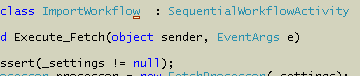
One way to open a smart tag is to hover the mouse over a 1 pixel hotspot that lives somewhere in the vicinity of the smart tag indicator.
Fortunately, Visual Studio assigns the same keyboard shortcut to open a smart tag as Office apps: Shift+Alt+F10. The keyboard is a better approach, but Shift+Alt+F10 is one of those piano virtuoso maneuvers. Splay your fingers, point your wrists outward, and attack the keyboard with a flourish. Actually, it’s not a bad exercise to avoid carpal tunnel. On my laptop, I sometimes open the smart tag, I sometimes turn off the LCD.
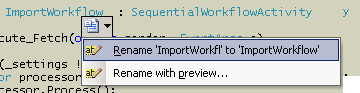
When I went into the Customize menu to assign a new keyboard shortcut, I found there is already an alternate shortcut assigned: Ctrl+. (see Tools -> Customize -> Keyboard -> and show commands for View.ShowSmartTag).
Ctrl+. is a better shortcut to open a smart tag, but I’m still waiting for the day when I can blink at the screen and get a reaction.
I’ve pounded on Visual Studio 2005 a lot this month. Overall, I’ve been happy with the IDE, and find myself more productive.
Stability: Good
Frans has been able to crash the IDE with a brace and with a mouse click. I’m happy I have not found any major problems. I did have a spectacular crash one afternoon with the old “Unexpected error encountered. It is recommended that you restart the application as soon as possible” message (HRESULT: 0x80131527 File: vsee\internal\vscomptr.inl Line: 473). Restarting was not an option as the message kept coming back. I had to kill the IDE, but didn’t lose any work.
One area I’ve found to be extremely delicate is the scripting engine integration. I have a few macros I use with Visual Studio. One of the macros uses the clipboard API. I’ve seen the macro crash vsmsvr.exe with a call to GetClipboard on several occasions. When vsmsvr.exe crashes unexpectedly, I can never get devenv.exe to accept input focus, and have to kill the IDE. The Windows clipboard seems fragile when I have both a remote desktop and virtual PC running.
Performance: Fair
Performance can drag at times. Refactoring operations on large projects are slow. My devenv.exe process has been hovering around 250MB of VM. Source control operations can also be slow. View pending check-ins can take forever when it needs to scan thousands of files, and simple add and delete operations often seem to hang the IDE for a few seconds at times.
Visual Studio 2005 ships with a few handy visualizers for debugging. A visualizer presents a tailored view of an object, which is useful when an object is too complex to fit in a watch window or data tip. Custom visualizers can plug into Visual Studio, see “How To: Write a Visualizer” as a starting point.
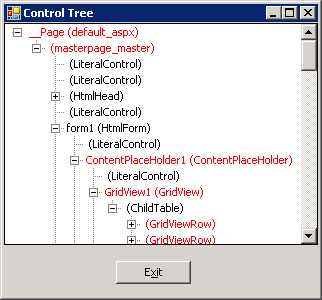
I’ve packaged up a couple custom visualizers I’ve used recently into a project: WebVisualizers.zip. The ControlTree visualizer shows the hierarchical relationship of web controls, starting with the visualized control at the top. For instance, if you hover over a this reference inside a web form class, and click the magnifying glass that appears, you’ll see all the controls on a form.
Controls implementing the INamingContainer interface appear in red. This visualizer was helpful in tracking down a misuse of FindControl. The second visualizer in the project will display an HttpCookieCollection in a grid view.
To install the a visualizer you have to build the source code. You can build with Visual Studio, or from the command line “msbuild OdeToCode.WebVisualizers.csproj”, assuming msbuild.exe is in the path. Copy the .dll from underneath the bin directory into “MyDocuments\Visual Studio 2005\Visualizers”. VS.NET will automatically load the assembly when debugging, and inspect the metadata inside to know what types to visualize. Note: custom visualizers won't load for a web site running at less than full trust.
These Visualizers here are relatively simple. Brett Johnson wrote a visualizer for the ASP.NET cache, and a wicked-cool visualizer to render controls.
A colleague once told me configuration management is to software development what oxygen is to a human. When the proper CM practices are in place, no one notices. When configuration management is non-existent or lacking, the development process chokes. The trick, as always, is to find the right level of process and auditing for the development task at hand.
Adam Barr gives us a look at what happens on the extreme end of the spectrum with the release of new Monad bits. Not only is Microsoft big (debug and release builds have to run a gauntlet of tests on 3 platforms x 3 architectures), but they are also understandably paranoid (you need three employees with cardkeys and PIN numbers to have an independent team sign bits with the Microsoft private key). Read the rest of the process in Adam’s post “Putting Out A New Release of Monad”.
One of the tools in the process that caught my eye was APIScan. APIScan ensures a product uses only publicly documented Windows APIs. This sounds crazy unless you remember the hidden API fiasco during the bubble years. The hidden APIs became a part of the anti-trust case, which added legal complexities to Microsoft’s CM process. A quick search finds this report on the website of the U.S. Department Of Justice. The report is an update on Microsoft’s compliance in the U.S. v Microsoft case, and mentions APIScan as a tool “to identify all APIs that must be disclosed in accordance with Section III.D”.
Aside: the report also documents that the Platform and Services division at MS offers quarterly ‘anti-trust’ training. Wow – that’s a triple shot espresso mocha session, if ever I heard one.
Next time I have to tweak a script for the build engine, I’ll remember things aren’t all that bad.

 OdeToCode by K. Scott Allen
 Subscribe
 Twitter
 Search
 About
About
 Learn C#