
In this article we'll look inside the messages exchanged in an HTTP transaction. We'll learn about message types, HTTP headers, and status codes. Understanding what is inside an HTTP message is vitally important for developers who work on the web. Not only will you build better applications by responding with the right types of messages, but you'll also be able to spot problems and debug issues when web applications aren't working.
The Series:
Part I: Resources
Part II: Messages (you are here)
Part III: Connections
Part IV: Architecture
Part V: Security
Requests and Responses
Imagine walking up to someone in an airport and asking "Do you know what time it is?". In order for the person to respond with the correct time, a few things have to be in place. First, the other person has to understand your question, because if they do not know English, they might not make any response. Secondly, the other person will need access to a watch or time keeping device.
This airport analogy is similar to how HTTP works. You need a resource from some other party (the resource being information about the time of day). So, you make a request to the other party using a language and vocabulary the other party might understand. If the other party understands your request and has the resource available, they can reply. If they understand the request, but they don't have the resource, they can still respond and tell you they can't help you. If they don't understand what you are saying, you might not get any response.
HTTP is a request and response protocol. A client sends an HTTP request message to a server using a carefully formatted message that the server will understand. A server responds by sending an HTTP response message that the client will understand. The request and the response are two different message types that are exchanged in a single HTTP transaction. The HTTP standards define what goes into these request and response messages so that everyone who speaks "HTTP" will understand each other and be able to exchange resources (or when a resource doesn't exist – a server can respond with an error message).
A Raw Request and Response
A web browser knows how to send an HTTP request by opening a network connection and writing out an HTTP message. There is nothing magical about the message – it uses plain ASCII text and a format conforming to the HTTP specification. Any application that can send data over a network can make an HTTP request. You can even make a manual request using an application like Telnet from the command line. A normal Telnet session connects over port 23, but as we learned in the first article, the default network port for HTTP is port 80. Below is a screen shot of a telnet session that connects to odetocode.com on port 80, makes an HTTP request, and receives an HTTP response.

The telnet session starts by typing "telnet www.odetocode.com 80" on the command line. The command tells the operating system to launch the telnet application, and tells the Telnet application to connect to www.odetocode.com on port 80.
Once telnet connects, we can type out an HTTP request message. The first line is "GET / HTTP/1.1" followed by the enter key. The first line tells the server we want to retrieve the resource located at "/" (the home page), and we will be using the HTTP 1.1 standard. The next line is "Host: www.odetocode.com". The host information is a required piece of information in an HTTP 1.1 request message. The technical reason for requiring host information is to help servers that support multiple web sites. Both www.odetocode.com and www.ode-to-food.com could be hosted on the same server, but the host information in the message will help the web server direct the request to the proper web application.
At this point we've formulated the message we want to send and we can press the enter key twice to send the message to the server. What you see next in the telnet window is the HTTP response from the web server. We'll break down the response later in the article, but I'll give you the high level overview now. The response says that the resource we want (the home page of www.odetocode.com), has moved. The home page has moved to the location odetocode.com (without the www). It's up to the client to parse this response message and send a new request to odetocode.com instead of www.odetocode.com (if it wants to retrieve the home page).
These "redirects" are common in web programming. In this scenario the reason is to make sure all requests go through odetocode.com and not www.odetocode.com. The redirection is part of a search engine optimization known as "url canonicalization".
Now that we've seen a raw HTTP request and response, let's dig into specific pieces.
HTTP Request Methods
The "GET" word typed into the telnet session shown above is one of the primary HTTP methods. Every request message must include one of the HTTP methods, and the method tells the server what the client wants to do with a resource. An HTTP GET wants to fetch and retrieve a resource. You could GET an image (GET /logo.png), or GET a pdf file, (GET /documents/report.pdf), or any other retrievable resource the server might hold. A list of common HTTP operators is shown in the table below.
| Method | Description |
| GET | Retrieve a resource |
| PUT | Store a resource |
| DELETE | Remove a resource |
| POST | Update a resource |
| HEAD | Retrieve just the headers for a resource |
Of these 5 methods, just 2 are the primary workhorses of the web: GET and POST. A web browser issues a GET request when it wants to retrieve a resource like a page, an image, a video, or a document. GET requests are the most common type of request.
A web browser sends a POST request when it has data to send to the server. For example, clicking "Add to Cart" on a site like amazon.com will POST information to Amazon about what we want to purchase. POST requests are typically generated by a <form> on a web page, like the form you fill out with <input type="text" /> elements for address and credit card information.
GET and Safety
There is a part of the HTTP specification that talks about the "safe" HTTP methods. Safe methods, as the name implies, don't do anything "unsafe" like destroy a resource, submit a credit card transaction, or cancel an account. The GET method is one of the safe methods since it should only retrieve a resource and not alter the state of the resource. Sending a "GET" request for a JPG image doesn't change the image, only fetches the image for display. In short – there should never be a side-effect to a GET request.
An HTTP POST is not a safe method. A POST typically changes something on the server – it updates an account or submits an order. Web browsers typically treat GET and POST differently since GET is safe and POST is unsafe. It's OK to refresh a web page retrieved by a GET request – the web browser will just re-issue the last GET request and render whatever the server sends back. However, if the page we are looking at in a browser is the response to a POST request, the browser will warn us if we try to refresh the page. Perhaps you've seen these types of warnings in your web browser.
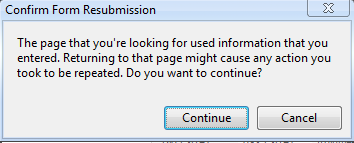
To avoid the warning, many web applications try to always leave clients viewing the response to a GET request. After a user clicks a button to POST information to a server (like submitting an order), the server will process the information and respond with an HTTP redirect (like the redirect we saw in the telnet window). the redirect will tell the browser to GET some other resource. The browser will issue the GET request, and now the server can respond with a "thank you for the order" resource. The user can refresh or print the page as many times as they like. This common pattern is the POST/Redirect/GET pattern.
Common Scenario - GET
Let's say you have a page and want the user to click a link to view the first article in this series. In this case a simple hyperlink is all you need.
"https://odetocode.com/Articles/741.aspx">Part I
When a user click on a hyperlink in a browser, the browser issues a GET request to the URL specified in the href attribute of the anchor tag. The request would look like this:
GET https://odetocode.com/Articles/741.aspx HTTP/1.1
Host: odetocode.com
Common Scenario – POST
Now imagine you have a page where the user has to fill out information to create an account. Filling out information requires <input type="text" /> tags, and these inputs go inside a <form> tag. The
<form action="/account/create" method="POST">
    <label for="firstName">First namelabel>
    <input id="firstName" name="firstName" type="text" />

    <label for="lastName">Last namelabel>
    <input id="lastName" name="lastName" type="text" />

    <input type="submit" value="Sign up!"/>
form>
When the user clicks the submit button, the browser realizes the button is inside a form. The form tells the browser to use a POST request, and the path to POST into is /account/create. The actual HTTP request the browser makes will look something like this:
POST http://localhost:1060/account/create HTTP/1.1
Host: localhost:1060

firstName=Scott&lastName=Allen
Notice the form inputs are included in the HTTP message as name-value pairs. This is the same format as the format for parameters in a URL query string, as we saw in Part I. It's up to the web application to take this request, parse those values, and create the user account. The application can then respond in any number of ways, but there are three common responses.
1) Respond with HTML telling the user they created the account. Doing so will leave the user viewing the result of a POST request. If they refresh the page, they will also resubmit the form. A refresh might try to sign them up a second time!
2) Respond with a redirect instruction. The redirect will point the browser to a new URL. The browser will GET the new URL full of HTML congratulating the user on thier new account. The user can safely refresh the browser.
3) If the user didn't provide all the required inforamtion, the application might respond with an error, or redirect to an error page. We'll take a look at error scenarios a little later in the article.
Common Scenarios – Forms and GET Requests
Another scenario is a search scenario. In a search scenario you need a <input type="text" /> for the user to enter a search term. It might look like the following.
<form action="/search" method="GET">
        <label for="term">Search:label>
        <input id="term" name="term" type="text" />
        <input type="submit" value="Sign up!"/>
form>
Notice the method on this form is GET, not POST. That's because search is a safe operation, unlike creating an account or booking a flight to Belgium. The browser will collect the inputs in the form and issue a GET request to the server:
GET http://localhost:1060/search?term=love HTTP/1.1
Host: localhost:1060
Notice instead of putting the input values into the body of the message, the inputs go into the query string portion of the URL. The browser is sending a GET request for /search?term=love. POST parameters go into the body of the HTTP message. GET praameters go into the query string. Since the search term is now in the URL, the user can bookmark the URL or copy the link and send it in an email. The user could also refresh the page as many times as they like, because the GET operation for the search results is a safe operation that won't destroy or change data.
A Word On Methods and Resources
We've talked quite a bit about resources as physical resources on the file system of the server. Resources like PDF files, video files, image files, and script files do commonly exist as physical files on a server. However, the URLs pointing inside of many modern web applications don't actually point to a file on the disk. Technologies like ASP.NET and Ruby on Rails will intercept the request for a resource and respond however they see fit.
A good example is the POST request to /account/create. Chances are there is no file named "create" in an "account" directory. Instead, something on the web server picks up this request, reads and validates the user information, and creates a record in the database. The resource /account/create is virtual and doesn't physically exist. However, the more you can think of a virtual resource as a real resource, the better your application architecture and design will adhere to the strengths of HTTP and the web that we will see in these articles.
HTTP Request Headers
So far we've seen a raw HTTP request and talked about the two popular HTTP methods – GET and POST. But as the telnet output demonstrated, there is more to an HTTP request message than just the HTTP method. A full HTTP request message consists of the following parts:
[method] [URL] [version]
[headers]
[body]
The message is always in ASCII text, and the start line always contains the method, the URL, and the HTTP version (most commonly 1.1, which has been around since 1999). The last section, the body section, can contain data, like the account sign-in parameters we saw earlier. When uploading a file, the body section can be quite large.
The middle section, the section where we saw "Host: odetocode.com", contains one or more HTTP headers (at least one header for HTTP 1.1, since host is a required header). Headers contain useful information that can help a server process a request. For example, in Part I we talked about resource representations and how the client and server can negotiate on the best representation of a resource (content negotiation). If the client wants to see resource in French it can include a header (the Accept-Language header) requesting French content.
GET http://odetocode.com/Articles/741.aspx HTTP/1.1
Host: odetocode.com
Accept-Language: fr-FR
There are numerous headers defined by the HTTP specification. Some of the headers are general headers that can appear in either a request or a response message. One example is the Date header. The client or server can include a Date header indicating when it created the message.
GET https://odetocode.com/Articles/741.aspx HTTP/1.1
Host: odetocode.com
Accept-Language: fr-FR
Date: Fri, 9 Aug 2002 21:12:00 GMT
Everything but the host header is optional, but when a header does appear it must obey the standards. For example, the HTTP specification says the value of the date header has to conform to the RFC822 format for dates.
Some of the more popular request headers appear in the table below.
| Header | Description |
| Referer | When the user clicks on a link, the client can send the URL of the referring page in this header. |
| User-Agent | Information about the user agent (the software) making the request. Many applications use the information in this header, when present, to figure out what browser is making the request (IE 6 versus IE 9 versus Chrome, etc). |
| Accept | Describes the media types (remember MIME types from Part I?) the user-agent is willing to accept. |
| Accept-Language | Describes the languages the user-agent prefers. |
| Cookie | Contains cookie information, which we will look at in a later article. Cookie information generally helps a server track or identify a user. |
| If-Modified-Since | Will contain a date of when the user-agent last retrieved (and cached) the resource. The server only has to send back the entire resource if it's been modified since that time. |
Wikipedia keeps a list of all the standard message headers. A full HTTP request might look like the following.
GET https://odetocode.com/ HTTP/1.1
Host: odetocode.com
Connection: keep-alive
User-Agent: Mozilla/5.0 (Windows NT 6.1; WOW64) Chrome/16.0.912.75 Safari/535.7
Accept: text/html,application/xhtml+xml,application/xml;q=0.9,*/*;q=0.8
Referer: http://www.google.com/url?&q=odetocode
Accept-Encoding: gzip,deflate,sdch
Accept-Language: en-US,en;q=0.8
Accept-Charset: ISO-8859-1,utf-8;q=0.7,*;q=0.3
Just a couple more observations on request headers.
Some headers contain multiple values, like the Accept header in the above example. It's basically listing the MIME types it likes to see, including HTML, XHTML, XML, and finally "*/*" (meaning I like HTML the best, but you can send me anything (*/*) and I'll try to figure it out).
Also notice the appearance of "q" in some of the headers. The q value is always a number from 0 to 1 and represents the relative "quality value" or "relative degree of preference" for a particular value. The default value is 1. Higher q values are "more desireable". There is a full discussion of q values in section 14 of the HTTP spec.
The Response
An HTTP response has a similar structure to an HTTP request. The sections of a response are:
[version] [status] [reason]
[headers]
[body]
The full HTTP response to the last request we listed might look like this (with most of the HTML omitted for brevity).
HTTP/1.1 200 OK
Cache-Control: private
Content-Type: text/html; charset=utf-8
Server: Microsoft-IIS/7.0
X-AspNet-Version: 2.0.50727
X-Powered-By: ASP.NET
Date: Sat, 14 Jan 2012 04:00:08 GMT
Connection: close
Content-Length: 17151

<html>
<head>
    <title>.Net related Articles, Code and Resourcestitle>
head>
<body>
 ... content ...
body>
html>
The opening line of a request starts off with the HTTP version, and then the all important status code and reason.
Response Status Codes
The status code is a number defined by the HTTP specification and the numbers fall into 5 categories.
| Range | Category |
| 100-199 | Informational |
| 200-299 | Successful |
| 300-309 | Redirection |
| 400-499 | Client Error |
| 500-599 | Server Error |
Although we won't detail all of the possible HTTP status codes, the following table will detail the most common codes. See the RFC for the full list of defined codes.
| Code | Reason | Description |
| 200 | OK | The status code everyone wants to see. A 200 code in the response means everything worked! |
| 301 | Moved Permanently | The resource has moved to the URL specified in the Location header and the client never needs to check this URL again. We saw an example of this earlier in the article when we used telnet and the server redirected us from www.odetocode.com to odetocode.com to give search engines a canonical URL. |
| 302 | Moved Temporarily | The resource has moved to the URL specified in the Location header. In the future, the client can still request the URL because it's a temporary move. This type of response code is typically used after a POST operation to move a client to a resource it can retrieve with GET (the POST / Redirect / GET pattern we talked about earlier). |
| 304 | Not Modified | This is the server telling the client that the resource hasn't changed since the last time they retrieved the resource, so they can just used a locally cached copy. |
| 400 | Bad Request | The server could not understand the request. The request probably used incorrect syntax. |
| 401 | Unauthorized | The client was not authorized to access the resource and might need to authenticate. More on 401s and security in a later article. |
| 403 | Forbidden | The server refused access to the resource for an unspecified reason. |
| 404 | Not Found | A popular code meaning the resource was not found on the server. |
| 500 | Internal Server Error | The server encountered an error in processing the request. Commonly happens because of programming errors in a web application. |
| 503 | Service Unavailable | The server will currently not service the request. This status code can appear when a server is throttling requests because it is under heavy load. |
Response status codes are an incredibly important part of the HTTP message because they tell the client what happened, or in the case of redirects, where to go next.
HTTP Status Codes versus Your Application
Remember that the HTTP status code is a code to indicate what is happening at the HTTP level. It doesn't necessarily reflect what happened inside your application. For example, imagine a user submits a sign-in form to the server, but didn't fill out the Last Name field. If your application requires the Last Name field to be present it will fail to create an account for the user. This doesn't mean you have to return an HTTP error code indicating failure. You probably want quite the opposite to happen – you want to successfully return some content to the client with a 200 (OK) status code. The content will tell the user they forget to provide a last name. From an application perspective the request was a failure, but from an HTTP perspective the request was successfully processed. This is normal in web applications.
Response Headers
A response also includes headers to give a client more data it can use to process the response. For example, the content type will be specified as a MIME type, as we talked about in part I. In the complete response we listed earlier, we can see the content type is html, and the character set used to encode the type is UTF-8. The headers can also contain information about the server, like the name of the software and the version.
The response headers that appear will depend on the type of response. For example, a redirection response (301 or 302) needs to include a Location header telling the client where to go next.
There are a number of headers devoted to caching and performance optimizations. ETag, Expires, and Last-Modified all provide information about the cacheability of a response. An ETag is an identifier that will change when the underlying resource changes, so comparing ETags is an efficient way to know if something needs to be refreshed. An expires header tells a client how long to cache a particular resource. The Cache-Control header we see in the response listed at the start of this section specifies how a response can be cached (in this case, private means the response was intended for a single user, and some intermediary on the network shouldn't cache the response and send it to some other user). We'll look at caching in part IV.
Where Are We?
In this part of the series we've learned that HTTP messages always come in pairs. First there is the request, and then there is the response. The information in these messages is all in readable text, and there are lots of tools you can use to inspect HTTP traffic on your machine. Fiddler is one such tool if you are running Windows. Fiddler is easy to use, and you can see raw HTTP requests and responses, including all the of the headers.
Messages are all about making sure both parties in a transaction understand what they are receiving. The first line of an HTTP message is always explicit about the intent. In a request message the first line includes the URL and HTTP method. In a response the first line includes a status code indicating how the request was processed. We also have headers moving in both directions that provide even more information about the request and response.
In Part III we'll go one step lower and see how these messages travel across the network.


 Subscribe
 Twitter
 Search
 About
About
 Learn C#