
If I was to compile a list of SQL’s most under used, unknown funtions – rollup and cube certainly top the list. Considering the hoops developers jump though to aggregate data in code I have no idea why these SQL statements are so underused. In this article we are going to look at with rollup what it is, what it does and how we can use it.
with rollup is an extension to the group by clause which can be used to generate aggregate groupings in a single query. It is used in conjunction with the aggregate function grouping and causes and additional column to be added to the record set which has a value of ‘1’. This allows us to differentiate the summary row from the data row where the value is 0. Lets look at the following example which you can run using the Northwind database.
SELECT
CASE
WHEN (Grouping(C.CustomerID)=1) THEN 'Report Total'
ELSE C.CustomerID
END AS CustomerID,
CASE
WHEN (Grouping(O.OrderID)=1) THEN 'Customer Totals'
ELSE cast(O.OrderID as varchar(20))
END AS OrderID,
CASE
WHEN (Grouping(OD.ProductID)=1) THEN 'Order Totals'
ELSE cast(OD.ProductID as varchar(20))
END AS ProductID,
Sum(UnitPrice) as UnitPrice,
Sum(Quantity) as Quantity
FROM [Order Details] OD
INNER JOIN Orders O
on O.OrderID = OD.OrderID
Inner Join Customers C
on C.CustomerID = O.CustomerID
GROUP BY C.CustomerID, O.OrderID,OD.ProductID with rollup
Lets look at the results we get when we run this query
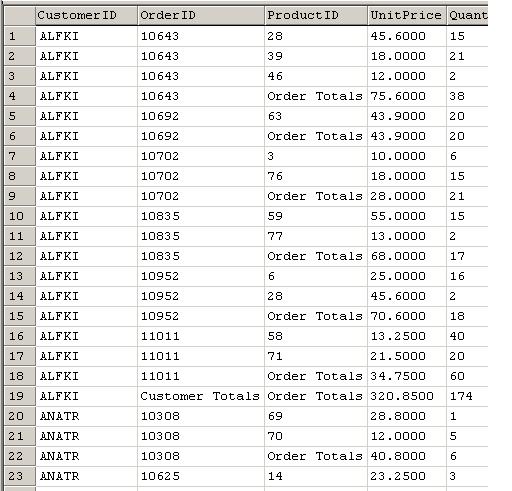
If we scroll down to the end of the report, we will also see the Total Unit Price and Total Quantity for the Report.
As we can see what the ROLLUP clause does is let SQL know that it needs to display both the detail and the aggregate total rows for each item in the GROUP by clause.
by Llama Lopon


 Subscribe
 Twitter
 Search
 About
About
 Learn C#