
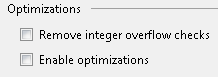
WWWTC #18 highlights the fact that integer overflow detection is ON by default for Visual Basic projects. To change the behavior, you need to go to into the project properties -> Compile -> Advanced Compile Options and click the "Remove Integer Overflow Checks".
In C# projects, overflow detection is OFF by default. To change the behavior, you need to go into the project properties -> Build -> Advanced and select the "Check for arithmetic overflow/underflow" check box.
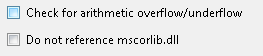
Changing the C# project settings is one solution to making the unit test in WWWTC #18 pass.
There is another option, too. Use the checked keyword in C#, as Johnathan, Jason, Ronin, and Dave pointed out.
Or …
There are a number of other subtleties to overflow detection – try some experiments with floating point and decimal data types to see what I mean, or jump to this article on the The Code Project: Arithmetic Overflow Checking using checked / unchecked.

 OdeToCode by K. Scott Allen
 Subscribe
 Twitter
 Search
 About
About
 Learn C#