
Terminals

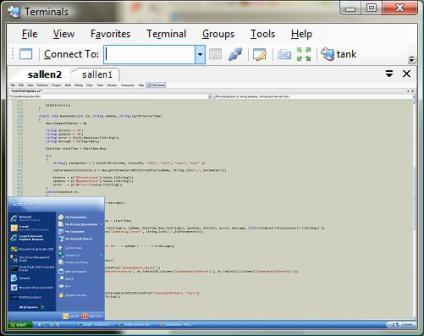
Terminals screen shotIf you are a heavy user of remote desktop connections, and you haven't tried Terminals, then give this free, open source utility from CodePlex a try.

"Terminals is a multi tab terminal services/remote desktop client. It uses Terminal Services ActiveX Client (mstscax.dll).
The project started from the need of controlling multiple connection simultaneously."

One of the great features in Terminals is the ability to set up a "group". One click on a group can open multiple RDP sessions at once. Terminals can also auto-scale a remote desktop to the window size, and setup a default desktop share for drag and drop operations into the remote desktop window.

Tip: If you are using a nonstandard port for RDP, don't enter the port number with the computer name (machine.foo.com:3399). This syntax doesn't work in Terminals. Instead, enter the port in the Remote Server Port textbox on the Advanced settings tab.


Print | posted @ Wednesday, July 11, 2007 1:12 AM

Comments on this entry:

Gravatar # re: Terminals
by Chris D at 7/11/2007 4:51 AM

Do you find Terminals better than the Remote Connections MMC snapin from the server 2003 admin pack? That's what I generally have been using.
  
Gravatar # re: Terminals
by Deepesh Shah at 7/11/2007 11:48 AM

agree with Chris, The MMC Snapin works much better to manage many RDP connections and is to switch between them

Deepesh
  
Gravatar # re: Terminals
by scott at 7/11/2007 4:55 PM

Chris, Deepash:

The two features I find I really like in Terminals are groups (one click opens three servers) and the auto-scaling. I haven't found a comparable feature in the MMC snap-in.

Plus, I like the tabbed interface better than the MMC tree view. :)
  
Gravatar # re: Terminals
by David Eliason at 7/17/2007 8:17 PM

visionapp Remote Desktop (www.visionapp.com/111.0.html?&ftu=74b201aa0c) is another good alternative.
  
Gravatar # re: Terminals
by Don Kitchen at 7/18/2007 5:40 PM

I just stumbled across the visionapp Remote Desktop today from a buddy and I think that's by far the best solution between the 3 discussed here. I was using Terminals since you posted about it and have since ditched it for vRD.
  
Gravatar # re: Terminals
by neotussanonis at 7/25/2007 8:42 PM

Royal TS is the best solution I've found to date, other than the pricy iShadow Desktop ($50 purchase, $25 per year fee), and I keep looking.


Royal TS
http://code4ward.net/CS2/Default.aspx

iShadow (if you wanted to check it out)
https://www.ishadow.com/Default.aspx
  
Comments have been closed on this topic.
Scott Allen
Posts - 869
Comments - 4493
Stories - 14