
Hope

Back in the old days (just last year, in fact), the stock disk defragmenter in Windows looked something like this:
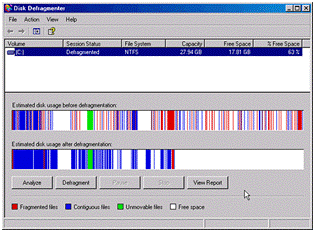
xp disk defragmenter

If you had no choice but to defragment a drive immediately, then at least you could entertain yourself by watching little green and red stripes bounce around inside the window. A quick glance could tell you if the defragmentation was nearing completion.

Along comes Vista, with a new defragmenter interface:
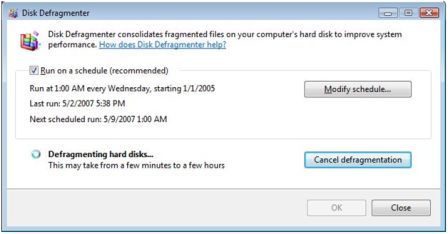
vista disk defragment

The defragmenter takes more of a Hollywood "don't call us - we'll call you" approach. I haven't found any red, green, and blue bars moving around to pass the time.

All I have left is hope.

I hope this finishes.

I hope this finishes soon.

Print | posted @ Thursday, June 28, 2007 1:12 AM

Comments on this entry:

Gravatar # re: Hope
by yipyip at 6/28/2007 3:15 AM

Gawd, it's like it was designed by Apple... "You do NOT want to know what your computer is doing. Here's a shiny animation!"
  
Gravatar # re: Hope
by scott at 6/28/2007 4:38 AM

The spinning circle is hypnotizing...
  
Gravatar # re: Hope
by Sahil Malik at 6/28/2007 4:43 AM

Thank god, you've stopped writing poems on your blog.

Y'know what is silly about vista's defrag? It ignores the fact that my laptop isn't switched on at 3AM on Wednesdays.

(Actually, sadly enough, mine is - but you know what I mean!)
  
Gravatar # re: Hope
by Fredrik at 6/28/2007 6:46 AM

I read a rather convincing article in the latest issue of PC Format (UK), saying that defragmentation is a total waste of time - the unnoticeable increase in access time you gain will never weigh up for the time it actually takes to perform the defrag, for one thing.
  
Gravatar # re: Hope
by BlueThunder at 6/28/2007 12:55 PM

Not surprised that another user does not like the Vista defragger. There are good and bad things about Vista, and its defragger certainly falls into the latter category.

Best to use a standalone defragger like Diskeeper Pro (that is what I use). Fast and comprehensive defragging of multiple drives at the same time, and the option to defrag the $MFT and other system files. Highly recommended.

Frederik: Defragging with progams like diskeeper does not take long. If you have heavily fragmented large volumes, then run defrag when not using the PC.eg overnight.

I havent read the article, but whoever claims file fragmentation has no effect on PC performance is smoking some strong stuff.
  
Gravatar # re: Hope
by Rodrigo at 6/28/2007 2:23 PM

At least, they kept the icon...
  
Gravatar # re: Hope
by andrew at 7/4/2007 9:40 AM

This is one of my pet hates too, for some reason I used to love watching those bars move around and now I never really defrag at all because it seems a waste of time.

I say next version the get, they need to make a screen where each bar is a cube, a little ship scrolls along the bottom and blasts them, collecting them in order down the bottom of the screen.

And maybe a little UFO scrolling back and forth along the top.
  
Comments have been closed on this topic.
Scott Allen
Posts - 869
Comments - 4493
Stories - 14
