
November 2005 - Posts

Sitemap Macro

I wrote a Visual Studio macro to walk an ASP.NET 2.0 project and create a web.sitemap based on the physical layout of files.

Download.

The macro requires a reference to System.Xml.dll. The macro won’t overwrite or synchronize an existing web.sitemap file, it’s only meant to save some typing if you have an existing project and want to add a sitemap. Once the macro creates the sitemap, you can go in and modify the titles, descriptions, and layout.

Update: Fixed the macro to work with IIS based projects, and added Dan Kahler's suggestion to prompt user to overwrite existing file.

posted by scott with 61 Comments

Building A New Mouse Trap V: Workflow

Windows Workflow Designer

When I first heard about Windows Workflow Foundation, I wasn’t particularly excited. “Workflow” has long been a buzzword used by vendors, product managers, and venture capitalists in mind numbing phrases like: “Our workflow solution will leverage your strategic business assets and put you in the fast lane of the information superhighway”.

Yawn.

Nevertheless, I knew some people who were taking Workflow seriously, so I decided to give the preview bits  a try. Workflow is a success. The designer works well – both the user interface and the programming interface are intuitive. For a good description of the feature set, which includes state machine workflows and long running workflows, see David Chappell’s “Introducing Windows Workflow Foundation”.

Here is a code activity that Workflow invokes. It would be nice if the Parameters turned into strongly typed properties.

private void Fetch_ExecuteCode(object sender, EventArgs e)

{

  FetchSettings settings = new FetchSettings();

  settings.ConnectionString = Parameters["ConnectionString"].Value as string;

  settings.LocalDataPath = Parameters["LocalDataPath"].Value as string;


  // ...


  FetchProcessor processor;

  processor = new FetchProcessorFactory.GetConfiguredFetchProcessor(settings);

  _files = processor.Process();          

}

To kick off a workflow...

private void StartImport()

{

  if (!workflow.IsStarted)

  {

    workflow.StartRuntime();

    workflow.WorkflowCompleted +=

           new EventHandler<WorkflowCompletedEventArgs>

                        (workflow_WorkflowCompleted);

    workflow.WorkflowTerminated +=

           new EventHandler<WorkflowTerminatedEventArgs>

                        (workflow_WorkflowTerminated);


  }


  Type importType = typeof(ImportWorkflow);


  Dictionary<string, object> parameters = new Dictionary<string, object>();

  // ...

  parameters.Add("LocalDataPath", Path.GetTempPath());

  parameters.Add("ConnectionString", Settings.Default.wfStatsConnectionString);


  workflow.StartWorkflow(importType, parameters);           

}

posted by scott with 1 Comments

Membership and Roles

I like to write about a topic before I give a presentation. Writing is my way of organizing random thoughts into an arbitrary collection of opinions.

When I signed up to do a presentation at the last local code camp, I got behind on writing about membership and role providers in ASP.NET 2.0. I finally finished the writing this weekend (Part I, Part II).

Miguel Castro also covered membership features at the last code camp. Miguel concentrated on the login controls and UI customization while I stuck more to the configuration and other details. Miguel knows a great deal about ASP.NET server controls –just listen to his .NET Rocks appearance. Two thumbs up!

posted by scott with 43 Comments

Spot the Authorization Bug

The following is an excerpt from PAG’s “How To: Use Role Manager in ASP.NET 2.0”.

You can control access to pages or folders to members of one of the built-in Windows groups by specifying the role in the format BUILTIN\groupName. The following example allows users in the built-in administrators group to view pages in the folder named memberPages and denies access to anyone else.


The problem is, the default authorization rule is: 


The ASP.NET module responsible for authorization checks iterates through rules starting with the local web.config file, and ending with the “allow all users” default rule. As soon as the module finds a rule matching the current user, it stops evaluating rules.

The PAG example is only denying access to anonymous users. If a user is authenticated, but not in the Administrator role, they'll still get access by falling through to the allow users="*" rule.

To really keep out non-Administrators, you want to use:


posted by scott with 2 Comments

Building a New Mouse Trap IV: XML

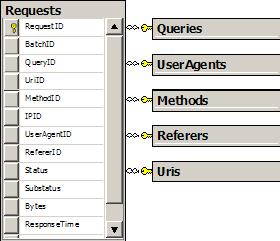
snowflake request schema

I had a star schema and an XML document of creamy data to stuff inside. What’s the best approach to updating the dimension tables with new values? There are many tried and true approaches to evaluate.

Let’s take the specific case of the Referers table. This table stores a RefererID, and a Referer string. I have an XML document full of Request elements, each with a Referer attribute. I needed to look at each element and find any Referer values that do not exist in the database to insert only new values.

<Request Date="2005-11-15T07:59:59Z"

        Uri="/Articles/rss.aspx"

        Referer=""

        Status="200"

        ResponseTime="609"

    />

One approach would be to parse the file, lookup each referrer in the database, and execute an INSERT statement if the value isn’t found. This approach uses at least two database roundtrips per request, so processing a large number of records will crawl.

Another approach is to pass the entire document to SQL Server 2005 and work with the new XML capabilities.

CREATE PROCEDURE [Stats].[ImportReferers]

    @WebStatistics AS XML

AS

BEGIN

    SET NOCOUNT ON;


    WITH XMLNAMESPACES(DEFAULT 'http://OdeToCode.com/wfStatsImport.xsd')


    INSERT INTO Stats.Referers


        SELECT DISTINCT request.value('@Referer', 'varchar(900)')


        FROM @WebStatistics.nodes('//Request') AS Request(request)

            LEFT JOIN Stats.Referers R ON

                R.Referer = request.value('@Referer', 'varchar(900)')


        WHERE R.Referer IS NULL

END

In SQL 2005 there are at least two approaches to transforming XML into a rowset. Once approach is OPENXML, but the code still gets a messy with pre and post-processing. A cleaner approach is to take advantage of the native XML data type in 2005, which offers query(), value(), exist(), modify() and nodes() methods. The nodes() method is just what I needed to transform XML elements into a relational table. The value() method can pull out an attribute to act like a column. All I needed then was a LEFT JOIN to find just the Referer values that didn’t already exist. Performance has been acceptable for a server running on Virtual PC.

posted by scott with 1 Comments

Building a New Mouse Trap III: SSIS

Once the web log files were downloaded and unzipped, I transformed them into an XML document and looked for a way to get the records into SQL Server. My first thought was to learn more about SQL Server Integration Services, the successor to DTS.
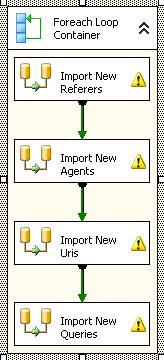
Integration Services at Work

I’ve used DTS in the past to fast-load millions of records into data marts. Although the performance numbers were excellent, I’ve always held misgivings about DTS because the packages were opaque, and difficult to maintain and use in generic solutions.

Although I made a fair amount of progress with SSIS, I ultimately ditched the approach for the following reasons:

  • The designer was painfully slow
  • The designer required too much ‘mouse’
  • The designer has bugs

I wanted to like SSIS. SSIS has made vast improvements over DTS. The packages are now XML files, meaning you can look at them, diff them, and check them into source control as text. There are more tasks available, and you can plug-in your own code.

The biggest obstacle was the Script Task would not let me design a script. The reason I wanted to execute a Script Task was to find an elegant solution to inserting a parent record, retrieving an identity value, and inserting child records with the identity as an FKEY. This common task seems to require an inordinate amount of work in SSIS.

posted by scott with 2 Comments

Building a New Mouse Trap II : Unzip

In 1.1 we needed third party libraries to compress and uncompress data. In .NET 2.0 we have GZipStream and DeflateStream classes. However, as Stephen Toub points out in .NET matters, these classes are don’t handle the headers, footers, and other metadata of popular archive formats like gzip and zip.

In looking for the simplest possible solution to unzipping a single file in a windows forms application, I decided to interop with Shell32.dll. The disadvantage appears to be the inability to perform a “silent” operation – the shell always displays a modeless progress dialog no matter what flags are passed to the CopyHere method.  I tried to do some native interop debugging to figure out if the flags parameters was somehow getting munged in the interop boundary, but gave up. Part of my frustration was the disappearance of the Registers and Modules windows in the Visual Studio menus. I had to look up the shortcut keys to get to these commands. Apparently, this is a “feature” of the 2005 IDE that Paul Litwin also ran into.

The advantage to using Shell32 is the small amount of code required.

public class UnzipLogFileTransformer : ITransformer

{

    public string TransformFile(string inputFileName)

    {

        Check.IsRootedFileName(inputFileName, "inputFileName");      

        string destinationPath = Path.GetDirectoryName(inputFileName);


        string outputFileName = Unzip(inputFileName, destinationPath);

        File.Delete(inputFileName);


        return Path.Combine(destinationPath, outputFileName);

    }


    private string Unzip(string inputFileName, string destinationPath)

    {

        Shell shell = new ShellClass();

        Folder sourceFolder = shell.NameSpace(inputFileName);

        Folder destinationFolder = shell.NameSpace(destinationPath);


        Check.IsTrue(sourceFolder.Items().Count == 1,

            "Archive should contain only 1 item");


        string outputFileName = sourceFolder.Items().Item(0).Name;

        Check.IsNotNullOrEmpty(outputFileName, "outputFileName");


        destinationFolder.CopyHere(sourceFolder.Items(),

                                    OpFlags.TotallySilent);


        return outputFileName;

    }

}

posted by scott with 3 Comments

Building New Mouse Traps Part I: FTP

I’m using the holiday break to build yet-another IIS log file retrieval / parser / reporting tool with Visual Studio 2005. Sure, there are plenty of these around already, but not that use Windows Workflow and SQL Server 2005 XML data types. If nothing else, the project was an exercise in learning new areas in 2005 and 2.0.

The first task was to retrieve a list of available log files from an FTP server. The 2.0 framework provides FTP support with the WebClient and FtpWebRequest classes. The WebClient is useful if you want a quick DownloadData call to retrieve an array of bytes. When dealing with large files you might not want the result in a single array, but instead stream bytes to a file as the download progresses.

I used the FtpWebRequest class, which like it’s cousin the WebRequest class, provides a heavily abstracted (yet amazingly low-level) interface for FTP work. If you are expecting to find a method to retrieve detailed file information, you won’t. You have to parse the directory list text yourself (see adarsh’s blog for a sample).

I went with the FtpWebRequest class to have control over streaming bytes to disk and parsing the directory contents.

public void DownloadFile(string remoteName, string localName)

{

    Check.IsRootedDirectoryName(localName, "localName");

    Check.IsNotNullOrEmpty(remoteName, "remoteName");


    WebRequest ftp = BuildFtpWebRequest(new Uri(remoteName));

    ftp.Method = WebRequestMethods.Ftp.DownloadFile;


    using (WebResponse response = ftp.GetResponse())

    using (BinaryReader reader = new BinaryReader(response.GetResponseStream()))

    using (BinaryWriter writer = new BinaryWriter(File.Open(localName, FileMode.Create)))

    {                                                             

        byte[] buffer = new byte[2048];

        int count = reader.Read(buffer, 0, buffer.Length);

        while (count != 0)

        {

            writer.Write(buffer, 0, count);

            count = reader.Read(buffer, 0, buffer.Length);

        }

    }

}

public List<string> GetFileNames(string remotePath)

{

    Check.IsNotNullOrEmpty(remotePath, "remotePath");


    List<string> result = new List<string>();

    WebRequest ftp = BuildFtpWebRequest(new Uri(remotePath));

    ftp.Method = WebRequestMethods.Ftp.ListDirectory;


    using (WebResponse response = ftp.GetResponse())

    using (StreamReader reader = new StreamReader(response.GetResponseStream()))

    {

        string line = reader.ReadLine();

        while (line != null)

        {

            result.Add(line);

            line = reader.ReadLine();

        }

    }

    return result;                       

}


protected virtual FtpWebRequest BuildFtpWebRequest(Uri uri)

{

    FtpWebRequest ftp = FtpWebRequest.Create(uri) as FtpWebRequest

        if (_credentials != null)

        {

            ftp.Credentials = _credentials;

        }           

    ftp.UseBinary = true;


    return ftp;

}

posted by scott with 4 Comments

Design Patterns: A Love Story

Richard tilted his head to watch the waves push flotsam against the boat hull below. Up and down, the flotsam moved. Up and down.

Richard had an idea.

“Virginia, my dear”, he said to the blond woman beside him. “We’ve been singletons on this ship for a long time”.

“I know, Richard”, she replied. “My mean step-mother, the intercepting filter that she is, denies me time with others.”

Richard paused for a moment, to contemplate strategy. Her father, with his pipes and filters, would return soon, and force them to communicate over his message bus. He glanced aft, and saw no one else around. Richard turned his front controller to face Virginia, and looked her in the eyes. She was close now, and Richard could feel his active record rising.

“Virginia”, he whispered. “There is no observer in sight. Let us run below deck. I want to peel away your façade, and tightly couple.”

“Oh yes, Richard”, she blushed, and leaned towards him. “I want you to give me a dependency injection”.

[Author’s note: I’m sorry. I can’t continue. Shortly after typing the words “give me a dependency injection”, I was overcome by a sudden sickness and fell to the floor in convulsions. Let’s just assume the story has a happy ending, and forget this post ever happened. OK?]

posted by scott with 16 Comments

Defining a Contract Is Hard

We often talk about interfaces defining contracts.

interface UserValidator

{

    bool ValidateUser(string username, string password);

}

The above interface seems simple. We can go to any object implementing the interface and invoke the ValidateUser method. Pass in a username and password, and the object will tell us if the user is valid.

Still, there is plenty left unspoken. Take the abstract base class MembershipProvider in ASP.NET. MembershipProvider includes an abstract ValidateUser method, just like the one in the interface defined above. Here are the remarks for the method:

Takes, as input, a user name and a password and verifies that the values match those in the data source. ValidateUser returns true for a successful user name and password match; otherwise, false.
For successful validations, ValidateUser updates the LastLoginDate for the specified user.

Now we know a little more about our “contract”. If we implement ValidateUser we should update the LastLoginDate during a successful validation. If software were really a science, I think we’d have some language construct to announce and enforce the LastLoginDate update.

There’s more though – if you look at the two available implementations of MembershipProvider in ASP.NET (SqlMembershipProvider and ActiveDirectoryMembershipProvider), they have another side-effect in common. Both classes increment performance counters and raise health monitoring events when users authenticate and fail to authenticate.

To the client who needs a method to validate a user, these events and perfcounters are inconsequential side effects. The events don't change the state of my object, or the provider. However, if I was a sysadmin who monitors failed authentication events, but can’t get the events to work when I plug in a custom build membership provider, I’d consider something broken.

A contract is a simple concept, but the devil still waits in the details.

posted by scott with 7 Comments

Debug and Release Builds in ASP.NET 2.0

One of the adjustments to make when moving from ASP.NET 1.1 to 2.0 is how to produce debug and release builds.

1.1

In 1.1 we had the Build -> Configuration Manager menu option. This command launched a dialog box to let you choose from the available build configurations. Visual Studio provided Debug and Release configurations by default. The configuration selected in the Configuration Manager would tell Visual Studio how to compile the code-behind files. A successful compilation would produce a single assembly (.dll) in the bin directory, with a debugging symbol file (.pdb) appearing if the configuration asked for debugging symbols

Sometime later, the application would receive a web request and begin to execute. At this point, the ASP.NET runtime would generate code for the web forms and user controls in the application, then compile the generated code. The compilation at runtime would use the debug setting in the compilation section of web.config to determine if it should compile optimized code, or debug code (with symbols). ASP.NET would place the results underneath the Temporary ASP.NET Files directory. It is important to select the Release configuration in VS.NET 2003 and set debug=”false” in web.config to produce a true production build in 1.1.

2.0

Here is the most important concept to come to terms with in 2.0: Visual Studio 2005 knows nothing about compiling a web application. In 1.1 VS built the code-behind and ASP.NET built the web forms. In 2.0 Visual Studio 2005 delegates all compilation responsibilities to the ASP.NET platform.

With that in mind, there are two scenarios to talk about: building a web application without a Web Site Deployment project, and building a web application with the Web Site Deployment project. Let’s start with “without”.

When you ask Visual Studio to build a web project, nothing seems to happen. You don’t get the comforting feeling of having a bin directory with a .dll file inside. This is because ASP.NET, not Visual Studio, performs the build. ASP.NET builds everything, including .cs and .vb code files. ASP.NET places all the resulting assemblies in a folder underneath the Temporary ASP.NET files directory. You’ll see the results of the build if you poke around in the directory.

Because ASP.NET does all of the compilation, the debug setting in the compilation section of web.config controls debug or release mode. Compile with debug=”true” and you’ll find the .pdb debugging symbol files alongside each assembly.

This new compilation model makes the Configuration Manager for a web site obsolete. The only option appearing in a Visual Studio 2005 web site “project” is a Debug configuration. Don’t fret – it means nothing. The web.config file now rules the school.

When you are ready to deploy, you can publish the web site. The Publish command (Build -> Publish) will precompile a web application and place the results into a directory of your choosing. You can also publish to an IIS or FTP location. When you select the Publish command you’ll see a dialog box to choose a destination, and options for strong naming, fixed naming, etc. These options map directly to switches for the command line aspnet_compiler tool (see my article for more details). The aspnet_compiler tool also provides a switch to produce debugging symbols, but this option is not available from the Publish dialog. Publish will always precompile a release build without debugging symbols.

Note: the Publish command does not change the debug setting in web.config. The Publish command always compiles for “release”, however, if you precompile to an updateable web site, and then update the web site in place (which results in dynamic compilations), those dynamic compilations will produce debug code and pdb files.

The new Web Site Deployment (WSD) project changes the above scenario slightly. The WSD adds Release and Debug configurations to the Visual Studio 2005 configuration manger. This does not mean that Visual Studio knows how to compile a web site. Instead, Visual Studio knows how to use the MSBuild file provided by WSD to ask for Debug and Release builds. You can now select Debug or Release from the Configuration Manager in Visual Studio. The build request ultimately arrives at the same aspnet_compiler tool described above, and used by the Publish command.

Unlike the Publish command, a WSD Release build will change the debug setting of web.config to false. The WSD also defaults to placing release builds in a Release directory and debug builds in a Debug directory, which is familiar to anyone using .NET outside of web forms. WSD is an awesome tool and I'm sure will be covered in more detail here (eventually).

In conclusion, you control debug and release builds using the debug attribute of the compilation section in web.config – unless you are precompiling the website with the Publish command or the Web Site Deployment tool. The WSD will let you select Debug or Release builds, precompiles the site, and modifies web.config appropriately.

posted by scott with 60 Comments Rated Excellent [5 out of 5].

Writing Configuration Files

2.0 provides ability to modify configuration files. As you might expect, it is difficult to modify a configuration file in a locked down environment. As an example, the following code tries to change the compilation section to disable batch compilation and enable debugging.

protected void ModifyConfig_Click(object sender, EventArgs e)

{

    Configuration config;

    config = WebConfigurationManager.OpenWebConfiguration("~");


    CompilationSection compilation;

    compilation = config.GetSection("system.web/compilation")

       as CompilationSection;


    compilation.Batch = false;

    compilation.Debug = true;


    config.Save();             

}

Two problems you’ll quickly run into:

The code throws an exception under medium trust because the code needs read privileges on all of the configuration files from which it inherits settings. Medium trust only grants file IO permissions in the application’s virtual directory.

The code will need write access to the directory where the configuration file exists – not just write access to the file itself. If you watch the file system with a tool like FileMon, you’ll see the runtime create a brand new .config file with a temporary name. I imagine this approach prevents change notifications from recycling app domains too many times and let's the runtime "swap" in the new settings with a delete and rename operation.

posted by scott with 1 Comments

SmartCHART for the Smartphone

A few weeks ago, I took the dive into Smartphones and bought an unlocked MPX-220. Even though the phone isn’t the latest and greatest gadget that some lucky people have, I’m happier with this phone than any phone I’ve ever had.

My first late-night project with the 2005 RTM build is a Smartphone 2003 application to scrape traffic information from the state of Maryland’s Coordinated Highways Action Response Team site. Hint: (if anyone is listening) – I could have built the app in half the time if the information was available from a web service or RSS feed.

traffic incidents speed sensor readings

Nothing earth shattering here: source and executable.

I wanted to use generics. I couldn’t understand why the compiler didn’t like the namespaces and angle-ly brackets until I read the manual. Smartphone 2003 SE projects only target CF.NET 1.0, which does make sense, if you think about it. No generics. Also, every other project type only targets .NET 2.0. I tried to put unit tests into a separate class library, but there were problems and I ultimately ended with NUnit tests inside the main executable ( #ifdef’ed away).

Daniel Moth’s post “Invoke CF and Full Fx” assured me I wasn’t going crazy thinking asynch programming on the compact framework is hard when compared to asych-ing with the full framework. Some APIs are missing (Control.InvokeRequired), and others are mutated (Control.Invoke is crippled). I skipped the asynch thing for now.

The emulator is a tad sluggish. I needed to install ActiveSync 4.0 for Internet connectivity from the emulator. I decided to switch to a Virtual PC to avoid a developer preview version of ActiveSync from hosing my machine. The error message that appears when trying to configure network settings for the emulator points to this page. The directions on the page are hidden and confusing, but ultimately take you to the Visual Studio for Devices blog post “Virtual PC Network Driver”. The post contains some good instructions (but also 11 broken images). No driver is needed - just ActiveSync 4.0.

Two issues I haven’t resolved:

1) Visual Studio 2005 deploys the kitchen sink to the emulator on every run. Even pre-installed assemblies like System.dll get shoved into the emulator, which makes for long waits during debugging. I did some searching and found some information that indicates this scenario shouldn’t occur, but didn’t find a definitive solution.

Update: By moving from NUnit 2.2.0 to 2.2.3 (the version that officially supports 2.0), the deployment problem went away.

2) I’ve been unable to scroll the CF.NET ListView control one “page” at a time. I’ve set FocusedItem properties, SelectedItem properties, invoked Update, invoked Refresh – nothing seems to highlight a new item X items away and moves focus to the item.

posted by scott with 5 Comments

Strong Typing and Nested Master Pages

Here is a little tip for getting a strongly typed Master property when using nested master pages in ASP.NET 2.0.

Let’s say you start with the following, top level master page:

<%@ Master Language="C#" %>


<script runat="server">


    public string BigFooterText

    {

        get { return BigFooter.Text; }

        set { BigFooter.Text = value; }

    }


</script>


<html>

<head runat="server"/>


<body>

    <form id="form1" runat="server">

    <div>

        <asp:contentplaceholder id="BigContent" runat="server"/>

        <asp:Label ID="BigFooter" runat="server"/>

    </div>

    </form>

</body>

</html>

A second, nested master page provides the content for the top level master.

<%@ Master Language="C#" MasterPageFile="~/BigMaster.master"  %>

<%@ MasterType VirtualPath="~/BigMaster.master" %>


<script runat="server">


    public string LittleFooterText

    {

        get { return LittleFooter.Text; }

        set { LittleFooter.Text = value; }

    }


</script>


<asp:Content ContentPlaceHolderID="BigContent" runat="server">


  <asp:ContentPlaceHolder ID="LittleContent" runat="server"/>

  <asp:Label ID="LittleFooter" runat="server"/>


</asp:Content>

Now finally, an ASPX content page using the nested master as it’s master page. Notice the web form can reach the BigFooterText property of the top level master page without casting.

<%@ Page Language="C#" MasterPageFile="~/LittleMaster.master" Title="Untitled Page" %>

<%@ MasterType VirtualPath="~/LittleMaster.master" %>

<%@ Reference VirtualPath="~/BigMaster.master" %>


<script runat="server">

    protected void Page_Load(object sender, EventArgs e)

    {

        Master.LittleFooterText = "hello";

        Master.Master.BigFooterText = "world";

    }

</script>


<asp:Content ID="Content1" ContentPlaceHolderID="LittleContent" Runat="Server">

This is some content

</asp:Content>

Comments:

Typically, the Master property of a form is of type MasterPage. The @ MasterType directive instructs ASP.NET to generate the code for a strongly typed MasterPage property, and to ensure the assembly is properly referenced in scenarios where the master page and the content page end up in different assemblies. The web form needs both an @ MasterType directive (for the nested master) and an @ Reference directive (to the top level master page) for the compiler to see both types.

This setup feels fragile to me. I think a better approach would be to remove the @Reference directive from the aspx file, and add a public member to the nested master page that can forward data to the top level master. This approach reduces coupling and results in less breakage when the inevitable round of changes come to the top level master.

posted by scott with 7 Comments

A Look At The Stars

The news in science this week is that NASA researchers think they are looking at infrared glows from the first stars of the universe.

I wonder … just how far back we will be able to go?


Dr. Mandleblot sat in front of the hooded display as a cat owner sits in front of his cat. He watched the device intently, while the device summarily ignored him.

“Only 10 more seconds, Scott, and I will be looking at the very beginning of the universe”, the doctor said, unassumingly.

My pulse spiked at the thought. I couldn’t believe how calm Dr. Mandleblot seemed to be. The good doctor would the first human to see the beginning of time itself. I glanced at the hooded display, and the small black curtain that surrounded it. The curtain allowed a viewer to block out all light, and concentrate solely on the incoming video. I imagined myself inside the curtain, and wondered just what I’d see.

A green light flashed. The satellite signal arrived at last.

“It’s time!”, Dr. Mandleblot said with a smile. He reverently lifted the curtain and leaned into the display.

I watched Dr. Mandleblot’s lower body for a long time. I wanted to ask him what he could see, but I knew if I was inside the curtain - I wouldn’t want to be disturbed. Suddenly, I could see the doctor’s legs twitch. Beneath the black cloth that draped his shoulders, I could see his muscles tighten. An alarm went off in my head. From my years of training as a secret service agent, I could see the tell tale signs of a person in danger.

“Doctor?”, I whispered, filled with fright. What could he see? What could be wrong? I began to worry about the doctor’s heart. I shifted into a position behind him, when suddenly…

“Good heavens!”, the doctor ejaculated.

“What is it?”, I shouted. “What do you see?”.

Dr. Mandleblot’s head flew out of the curtain. His eyes were squinting at the sudden change in the light level, but his mouth was wide open. “We’ve gone too far!”, he cried, and jumped to his feet.

“What?”, I shouted.

The doctor began to make his way across the room, clutching at chairs on the way to the door. He turned and looked at me again – a melancholy stare in his eyes. “We’ve gone too far”, he whispered, and shook his head.

“Doctor”, I said firmly. “What … did … you …. see?”.

“Read the fine print”, he said, and walked out the door. I turned back to face the device, looking around the curtain. I was looking for a sign - some writing. Fine print? What was the doctor trying to say? Finally, I gathered my strength, and put my head under the cloth.

My eyes adjusted to the darkness, and I could see the stars. At least I thought they were stars - but they started to move  rapidly, and then suddenly froze. The spots of light seemed to form symmetric blocks. Before I could begin to analyze the patterns, the lights started to swirl again .... then froze.

I gasped.

The lights looked like Chinese logographic writing. Unfortunately, I skipped Chinese studies during my secret service training. Then the lights were swirling again … and they stopped one more time.

My jaw dropped.

I could see letters of the English alphabet. My mind was so stunned by the appearance of these letters, I almost didn’t see the message.

Yes. A message.

There is a message at the beginning of the universe.

The message reads like this:

“The unauthorized reproduction or distribution of this copyrighted universe is illegal. Reverse engineering of this universe without the express consent of the copyright holder is also illegal. Development of a new universe built upon this universe (a derivative universe) is expressly prohibited. Violators will not only be prosecuted – they will be atomized”.

posted by scott with 4 Comments

Health Monitoring in ASP.NET 2.0

ASP.NET 2.0 includes a nifty new feature known as Health Monitoring. The name might be a bit misleading, as the feature is really an extensible and general-purpose framework for producing and capturing events during the life of an ASP.NET application. Health monitoring can be useful in a number of scenarios, for instance, health monitoring is useful to administrators who need to monitor an application and be notified when a critical error occurs, or to developers who need to add instrumentation to a mis-behaving application.

The runtime includes a number of classes to represent events. There is a class to represent authentication failures, a class to represent request errors, and more. You can find out the reason for an application restart, and find out when a compilation occurs. You can even derive a class from System.Web.Management.WebBaseEvent to encapsulate your own custom events. If you just want to raise a simple event, instantiate an existing event class and invoke the Raise method.

You capture events using one of the built in event providers. There is a provider to capture events and send email notifications, a provider to log events to SQL Server, a provider to expose events via WMI, and a provider to drop events into an event log. As the name implies, Microsoft built event providers using the pervasive provider model. You can also build a custom event provider and plug into the health monitoring system.

Three providers come pre-configured: the event log provider, the WMI provider, and the SQL Server provider. The default SQL Server provider will log events into a SQL Express aspnetdb database in the special App_Data folder. To log events to a different instance of SQL Server, even a remote instance, you simply need to provide a bit o’ configuration love in web.config:


            connectionStringName="RemoteServerCS"

            maxEventDetailsLength="1073741823"

            buffer="false"

            bufferMode="Notification"

            name="MySqlWebEventProvider"

            type="[SqlWebEventProvider strong name]" />                               


            eventName="All Events"

            provider="MySqlWebEventProvider"/>           


    ...


ScottGu has all the details on switching the default database configuration in his post: “Configuring ASP.NET 2.0 Application Services to use SQL Server 2000 or SQL Server 2005”.

In the above web.config is the rules section. The rules section controls which events the ASP.NET runtime will deliver to a provider. In the config snippet above, we are asking for “All Events” to come to our database via the MySqlWebEventProvider. ASP.NET 2.0 groups events into categories such as “All Events”, “Heartbeats”, “All Audits”, “Failure Audits”, “All Errors” and more using an eventMapping section in the machine’s web.config file (in the CONFIG directory of the .NET framework installation, typically \Windows\Microsoft.Net\Framework\v2.x\Config). Take a look at the file to see the default categories. You can also define your own event categories using an eventMapping section in your application’s web.config file.

One question that comes up with health monitoring is when to use health monitoring and when to use a tool like the Logging and Instrumentation block in Enterprise Library. If you have to provide logging and instrumentation outside of an ASP.NET web application or web service, obviously the block is the solution. Inside of ASP.NET, health monitoring is certainly easy to use and extend, so I wouldn’t see a need to pull in enterprise library for the sole purpose of adding logging functionality.

posted by scott with 20 Comments
